




Product Information
What is Ultraviewer?
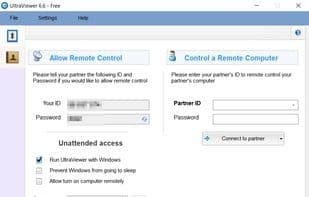
UltraViewer is a free, lightweight software that enables remote control and support for other computers. It provides a remote desktop control platform, allowing you to manage someone else's computer as if you were physically present. This remote support feature facilitates assistance to clients or partners from any location. UltraViewer prioritizes security, permitting clients to monitor your activities on their screen and take control at any time. It includes a chat window for communication while managing a computer, which can be accessed by pressing F1 during remote control of another machine and closed when not in use. UltraViewer also supports file sharing via the chat window, enabling secure sending and receiving of files under the partner's supervision. It offers multi-computer control, allowing you to manage multiple computers simultaneously or share screens with several machines at once.
How to use Ultraviewer?
UltraViewer is a free, lightweight remote desktop software that provides remote control and support for other computers, allowing users to manage remote PCs as if they were there, offering assistance to clients or partners.
Core Functions of Ultraviewer
Screen Sharing
Remote support
Integrated chat
Multilingual
Remote computer access
Real-time collaboration
Usage Scenarios of Ultraviewer
- Provide remote technical support to clients or partners.
- Conduct online education.
- Software company technicians remotely assist clients in solving issues.
- Control multiple computers simultaneously.
- Share screens with multiple computers.
Common Questions about Ultraviewer
What does UltraViewer do?
How do I use UltraViewer?
What are the core features of UltraViewer?
What are the use cases for UltraViewer?




















