



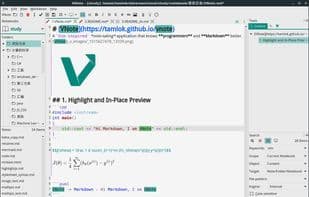

Product Information
What is Vnote?
Focus
Markdown doesn't require side-by-side live preview. Concentrate on your notes in reading and editing modes.
Cross-Platform
VNote is built with C++ and Qt, designed for major desktop platforms.
Simple Management
Pure text, no databases.
A single directory can hold one notebook.
A notebook contains folders with unlimited levels.
Folders store your notes.
Own Your Data
All files reside on your local disk. Use third-party sync services to work seamlessly anywhere.
Enjoyable Markdown Experience
Minimize the gap between reading and writing Markdown.
Adjusted and meaningful syntax highlighting for Markdown.
Inline image link previews.
Copy/paste images without clutter.
Syntax highlighting for code blocks in edit mode.
Interactive Outline
Highly Customizable
Themes, styles, behaviors—everything can be tailored to your taste.
By Programmers, For Programmers
Leverage the power of code editors for writing Markdown notes.
Vim mode
Line numbers
Multiple tabs
Split windows
Powerful shortcuts
Features
Simple Images
Insert images directly from the clipboard. Preview images in edit mode.
Code Blocks
Syntax highlighting for code blocks in both edit and read modes.
Interactive Outline
Interactive outline available in both edit and read modes.
Extensions
Support for Mermaid, Flowchart.js, and MathJax.
Attachments
Link all related files to your notes via attachments.
VNote is under active development. Submit your issues or pull requests to help shape VNote.
How to use Vnote?
VNote is a Vim-inspired Markdown note-taking app designed for programmers. It offers plain-text storage, cross-platform support, and a highly customizable editing experience, helping users focus on note content.
Core Functions of Vnote
Lightweight
Privacy-Focused
Markdown Support
Wiki-Like Interface
Save Attachments
LaTeX Support
Usage Scenarios of Vnote
- Programmers use Markdown to document notes and code snippets.
- Seamlessly access and edit notes across different devices via third-party sync services.
- Insert images, charts (e.g., Mermaid, Flowchart.js), and mathematical formulas (MathJax) into notes.
- Manage related files by linking them as attachments in notes.
- Create personal Wiki pages in Markdown format.
Common Questions about Vnote
What does VNote do?
How do I use VNote?
What are the core features of VNote?
What are the use cases for VNote?




















