



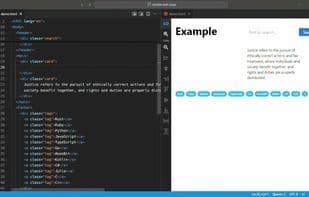

Product Information
What is Web visual editor?
Real-time visual editing of HTML files.
Features:
Visual Editing: Visually edit HTML elements within a WebView.
Live Preview: View changes reflected instantly as you edit.
Integration with Visual Studio Code: No additional processes or windows required, seamlessly integrates with VSCode themes.
Functionalities:
Element Selection: Easily select HTML elements. Visual selection syncs with text selection in the editor.
Zoom In and Out: Magnify or reduce the page view.
Move Elements: Drag elements to rearrange their positions.
Align Elements: Effortlessly align elements.
Copy, Cut, and Paste Elements: Duplicate or cut elements, and paste text into selected elements.
Script and Link Management: Disable scripts and manage links for security.
How to use Web visual editor?
Web Visual Editor is a VS Code extension for real-time HTML editing with instant previews, improving development efficiency.
Core Functions of Web visual editor
Focus on privacy
No Registration Required
Available Offline
No Tracking
Real-Time Preview
Ad-Free
Usage Scenarios of Web visual editor
- Visually edit HTML elements in the WebView of Visual Studio Code.
- View real-time effects of modifications made to HTML files.
- Easily select HTML elements and synchronize selections in the text editor.
- Rearrange the positions of elements in an HTML page by dragging.
- Copy, cut, and paste HTML elements.
- Align HTML elements on a page.
Common Questions about Web visual editor
What does Web Visual Editor do?
How do I use Web Visual Editor?
What are the core functions of Web Visual Editor?
What are the application scenarios of Web Visual Editor?



















