




Product Information
What is Wifispot?
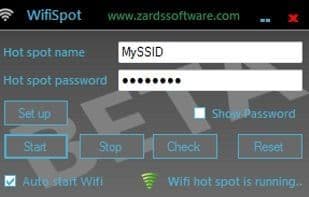
A WiFi hotspot transforms your WiFi-enabled Windows 7 laptop or PC into a virtual router, allowing other wireless devices such as laptops, smartphones, PDAs, tablets, iPads, PS3s, and more to connect to your PC and utilize its internet connection. It can also be used to extend the range of an existing WiFi network. The wireless network created with WifiSpot employs WPA2 encryption to ensure top-notch security. Share any internet connection wirelessly, even another Wi-Fi network. With the auto-recovery feature, it automatically restarts after network or device errors.
How to use Wifispot?
WifiSpot turns WiFi-enabled Windows 7 laptops into virtual routers, sharing internet and extending existing WiFi ranges.
Core Functions of Wifispot
Wi-Fi Sharing
Usage Scenarios of Wifispot
- Allow laptops to share an internet connection via PC.
- Enable mobile devices like smartphones and tablets to connect to the internet through a PC.
- Allow gaming devices such as PS3 to connect to the internet via a PC.
- Extend the coverage of an existing Wi-Fi network.
Common Questions about Wifispot
What does WifiSpot do?
How do I use WifiSpot?
What are the core features of WifiSpot?
What are the application scenarios of WifiSpot?



















