



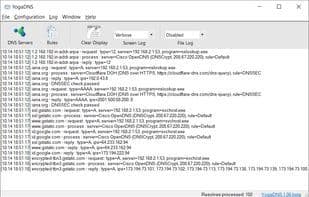

Product Information
What is Yogadns?
System-Level Integration
Automatically intercepts all requests from system resolvers and applications
No need to manually change DNS configurations
Protocols
Standard DNS, DNSCrypt, and DNS over HTTPS
DNSSEC with local validation
IPv4 and IPv6
Flexible Rules
Define multiple DNS servers and resolve through them based on hostname masks
Specify network interfaces (Ethernet, Wi-Fi, VPN, etc.) for resolution
Enhanced DNS Security
Encrypted name resolution via DNSCrypt and DNS over HTTPS protocols
Ensures resolution consistency and authority with DNSSEC
Prevents IP address leakage through DNS
DNS Server Management
Assign specific DNS servers to particular DNS names using flexible rules
Use specific network interfaces (e.g., VPN connections) for certain DNS names (e.g., *.corp.example.net)
Log queries for troubleshooting
New Technologies and Deployment
Easily enable any system to use cutting-edge DNS protocols like DNSSEC, DNSCrypt, and DNS over HTTPS
Import and export configuration files
How to use Yogadns?
YogaDNS is an advanced DNS client for Windows that automatically intercepts DNS requests at the system level and allows users to process these requests using custom DNS servers with modern protocols and flexible rules, enhancing DNS security and management flexibility.
Core Functions of Yogadns
Privacy-Focused
Lightweight
DNS leak blocking
DNS over HTTPS
Encrypted Connections
DNS cache
Usage Scenarios of Yogadns
- Define and resolve multiple DNS servers by hostname masks.
- Enhance DNS security via encrypted channels like DNS over HTTPS or DNSCrypt.
- Assign specific DNS servers for certain domains (e.g., corporate intranet) and specify network interfaces (e.g., VPN).
- Log DNS queries for troubleshooting.
- Enable advanced DNS protocols like DNSSEC, DNS over QUIC, and DNS over HTTPS.
Common Questions about Yogadns
What does YogaDNS do?
How do I use YogaDNS?
What are the core features of YogaDNS?
What are the use cases for YogaDNS?



















