
Product Information
What is Missive?
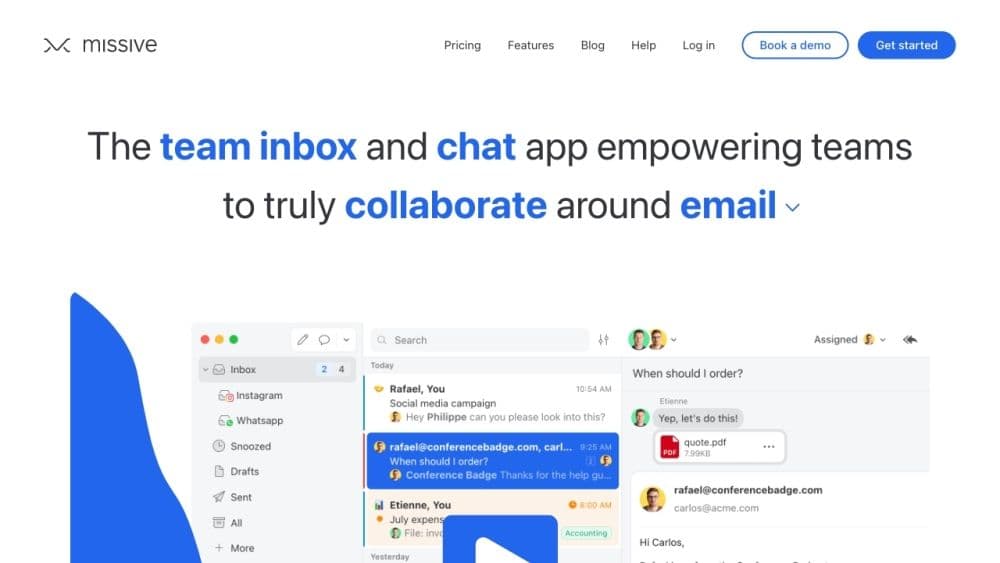
Missive is a team collaboration platform that integrates email, group chat, and task management into one. It provides an application for all internal and external communications, enabling teams to collaborate more efficiently.
How to use Missive?
To use Missive, simply sign up for an account and invite your team members. You can then connect email accounts, create shared inboxes, and start collaborating on tasks and projects. Utilize the team chat feature for real-time discussions, organize conversations with threaded chats, and keep track of who's doing what. With Missive, you can manage all communication channels in one place, ensuring clarity and accountability.
Core Functions of Missive
Team email: Manage all emails and shared inboxes in one app
Group chat: Real-time discussions with team members
Tasks: Collaborative tasks and projects, assign duties and track progress
Work management: Stay organized and focused with scoped conversations
Threaded chats: Organize discussions and track important conversations
Team inbox: Collaborate around any shared inbox including email, SMS, web chat, etc.
Gmail integration: Connect Gmail accounts to access emails directly in Missive
Web and OSX apps: Use Missive on the web or download the OSX app for desktop access
Shared mailboxes: Share email inboxes with team members for efficient collaboration
Usage Scenarios of Missive
- Internal team collaboration
- External communication with clients or partners
- Task and Project Management
- Shared inbox management
- Real-time team chat
- Email management and organization
Common Questions about Missive
No common questions available, please contact customer service for details