
Product Information
What is Papper?
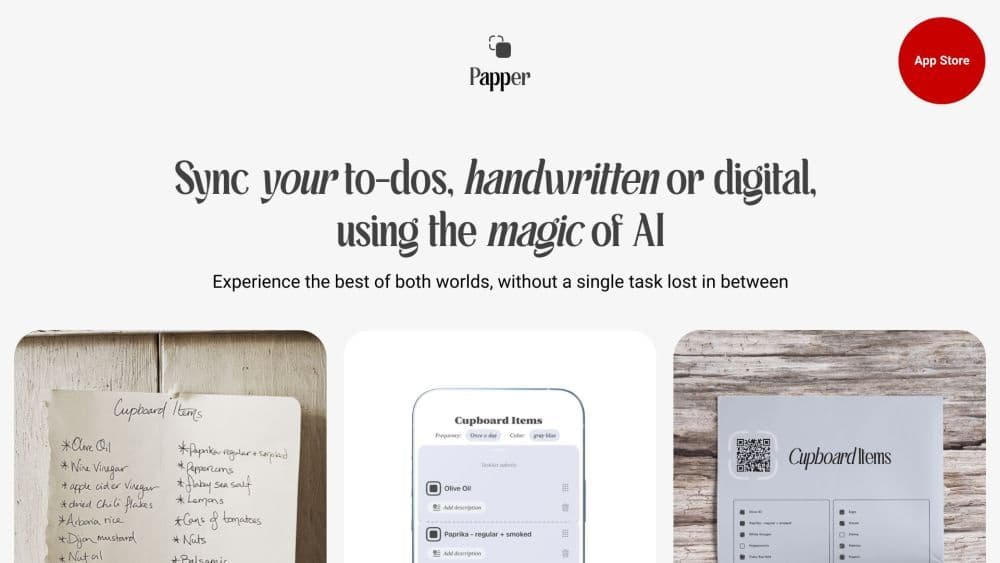
Papper is an innovative iOS app designed to bring more organization and efficiency to your life. It transforms handwritten notes into digital to-do lists, allows you to create and print your own checklists, directly scans your progress from these lists, and offers a wide range of pre-made checklists.
How to use Papper?
To use Papper, download the app from the App Store and install it on your iOS device. Once installed, open the app and start creating to-do lists by handwriting or adding digital tasks. You can also create and print your own checklists. To sync progress, scan handwritten marks from printable checklists. Papper will automatically update task progress in the app.
Core Functions of Papper
Handwriting recognition: Take a photo of handwritten tasks, and Papper's AI will digitize them.
Task management: Create and manage task lists directly in the app or sync with Apple Reminders.
Focus design: Better focus on a single task with Papper's design.
Recurring task checks: Stay on schedule with Papper's recurring task check feature.
Handwritten mark sync: Mark tasks on printed checklists, and Papper will update your progress in the app.
Stylish printing: Use Papper to transform digital tasks into beautiful, distraction-free printouts.
Usage Scenarios of Papper
- Papper can be used for personal task management, project planning, shopping lists, event organization, and more. Its versatility makes it suitable for individuals, professionals, and students.
Common Questions about Papper
What is Papper, and what does it do?
How does Papper convert handwritten notes into to-do lists?
Can I update my tasks in Papper by scanning handwritten marks?
What pre-made checklists does Papper offer?
What devices does Papper support?
Is Papper free to use?