



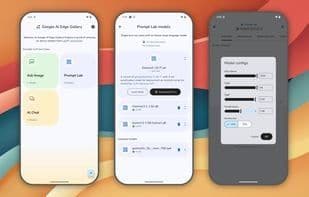

Product Information
What is Google ai edge gallery?
Explore, experience, and evaluate the future of device-generated AI with Google AI Edge. The Google AI Edge Gallery is an experimental app that brings the power of directly generated AI models right into your hands, running entirely on your Android (available now) and iOS (coming soon) devices. Dive into a collection of creative and practical AI use cases, all operating locally—once the model is loaded, no internet connection is required. Experiment with different models, chat, ask questions about images, explore prompts, and more!
Key Features:
- **Runs Locally, Fully Offline:** Experience the magic of GenAI without needing an internet connection. All processing happens directly on your device.
- **Choose Your Model:** Easily switch between and compare the performance of different models from Hugging Face.
- **Ask About Images:** Upload an image and ask questions about it. Get descriptions, solve problems, or identify objects.
- **Prompt Lab:** Summarize, rewrite, generate code, or explore single-turn LM use cases with freeform prompts.
- **AI Chat:** Engage in multi-turn conversations.
- **Performance Insights:** Real-time benchmarking (TTFT, decoding speed, latency).
- **Bring Your Own Model:** Test local LiteRT .task models.
- **Developer Resources:** Quick links to model cards and source code.
How to use Google ai edge gallery?
Google AI Edge Gallery is an experimental app designed to bring cutting-edge generative AI models directly to users' Android and iOS devices. It allows users to explore, experience, and evaluate on-device generative AI use cases without an internet connection.
Core Functions of Google ai edge gallery
AI-Powered, AI Chatbot
Usage Scenarios of Google ai edge gallery
- Run generative AI models locally on your device without an internet connection.
- Upload images and ask questions to get descriptions, solve problems, or identify objects.
- Use the Prompt Lab for text summarization, rewriting, code generation, or free-form exploration.
- Engage in multi-turn conversations with AI.
- Test your own local LiteRT .task model.
- Compare the performance of different AI models.
Common Questions about Google ai edge gallery
What does Google AI Edge Gallery do?
How do I use Google AI Edge Gallery?
What are the core features of Google AI Edge Gallery?
What are the application scenarios of Google AI Edge Gallery?



















