




Product Information
What is Kerlig-ai?
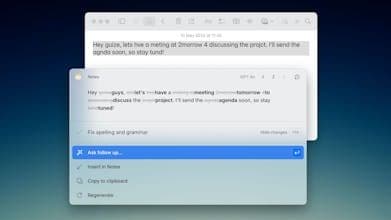
Kerlig AI is highly praised for its seamless integration with MacOS, delivering a smooth and intuitive user experience. Users appreciate its ability to customize prompts and actions, making it adaptable to various writing environments. Non-native speakers and students find it particularly beneficial for improving grammar and sentence structure, serving as both a personal editor and academic guide. The app's real-time support and content summarization save users time and boost productivity. Overall, Kerlig AI is regarded as a reliable and effective writing assistant that naturally fits into users' workflows.
How to use Kerlig-ai?
Kerlig AI is an AI writing assistant designed for macOS, seamlessly integrating into workflows to help users write, proofread, summarize text, and improve grammar and sentence structure, saving time and enhancing communication efficiency.
Core Functions of Kerlig-ai
AI Summarization, AI Writing, AI-Driven, OpenAPI Integration, AI Chatbot, Chat with Documents
AI Summarization
AI writing
AI-Driven
OpenAPI Integration
AI chatbot
Document chat
Custom Prompts and Actions
Grammar Check and Writing Improvement
Text Summarization and Content Simplification
Chat with Documents, Web Pages, eBooks, and Images
Support for Multiple AI Models and Local Models
Integration into macOS Workflow with Shortcut Support
Usage Scenarios of Kerlig-ai
- Compose emails, Slack replies, and Jira tickets
- Proofread text and correct grammar errors
- Students use for academic writing and grammar improvement
- Engage in interactive conversations with documents, web pages, ebooks, and images
- Conduct in-depth research and summarize information
- Improve written communication efficiency in daily work
Common Questions about Kerlig-ai
What does Kerlig AI do?
How do I use Kerlig AI?
What are the core features of Kerlig AI?
What are the use cases for Kerlig AI?



















