




Product Information
What is 120 ai chat?
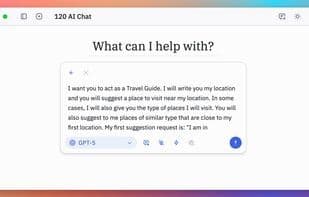
120 AI Chat is a native AI client designed to feel right at home on your desktop. It's not a sluggish web wrapper but built directly for macOS (with Windows and Linux versions on the way). The focus is on speed, responsiveness, and workflows that developers and power users can rely on daily.
With 120 AI Chat, you can:
- Run multiple conversation threads side by side
- Use reasoning models for deeper problem-solving
- Generate images with Gemini Flash 2.5, GPT Image 1, Grok Image 2, Stable Diffusion, and Flux 1 (via Hugging Face)
- Connect to Hugging Face or open models for additional options
- Enjoy a developer-friendly interface with code themes and syntax highlighting
- Keep conversations private with local storage
- Attach files (PDFs, images) to chats
- Chat with image inputs
Coming soon:
- Retrieval-Augmented Generation (RAG)
- Model Context Protocol (MCP) support
- Native Windows and Linux builds
AI apps should be as fast and integrated as the OS itself. 120 AI Chat is our attempt to give developers, writers, and everyday users a tool they genuinely enjoy using.
How to use 120 ai chat?
120 AI Chat is a native cross-platform AI client designed for fast, responsive experiences, supporting multi-threaded conversations, image generation, and interaction with various AI models to meet developers' and power users' daily needs.
Core Functions of 120 ai chat
Distraction-Free, Privacy-Focused, Lightweight, Text-to-Image Generation, No Tracking, No Coding Required
Usage Scenarios of 120 ai chat
- Run multiple conversation threads simultaneously for easy context switching.
- Use reasoning models for deep problem-solving.
- Generate images with models like Gemini Flash 2.5 Image, GPT Image 1, and Stable Diffusion.
- Connect to Hugging Face or OpenRouter to access more AI models.
- Develop with code themes and syntax highlighting features.
- Import PDF, Word, or Markdown files for intelligent knowledge retrieval and source citation.
Common Questions about 120 ai chat
What does 120 AI Chat do?
How do I use 120 AI Chat?
What are the core features of 120 AI Chat?
What are the application scenarios for 120 AI Chat?



















