




Product Information
What is Promptdc?
VIBE Coding Prompt
Ever found yourself typing "fix this" for the tenth time or stuck with typos and unclear prompts while vibe coding? Same here. As builders, we all have those moments when the AI just doesn’t "get" us, and we end up blaming the model, reverting to older versions, or rewriting the same thing over and over. But let’s be real... most of the time, it’s not the model. It’s the prompt.
That’s why I built PromptDC.
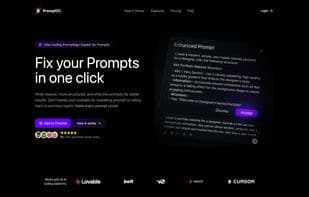
Whether you’re using web-based platforms like Cute, Bolt, Replit, or local editors like VS Code and Windsurf, we’ve got you covered. Just write your prompt, hit the keyboard shortcut or the "Enhance" button, and PromptDC instantly upgrades your prompt.
How it works:
1️⃣ Write your prompt in any supported web-based AI platform or local editor.
2️⃣ Click the "Enhance" button on the text field or use the keyboard shortcut.
3️⃣ Your prompt is automatically replaced with an enhanced version.
How enhancement works:
Based on the AI model you’re using (Cursor, Cute, Bolt, Replit, Cline, etc.), our extension reads its system prompt to understand how that model operates, then refines and restructures your input to make it clearer. This helps the model produce better, more accurate results.
I built PromptDC because I got tired of repeating myself. One click should be enough to get the results you want.
If you’ve ever been frustrated by endless rewrites, misunderstood requests, or just want to save some keystrokes (and headaches), then PromptDC is for you.
Chrome Extension works with:
Cute, Replit, Windsurf, Bolt.New, V0, Devin.ai, Manus, Clackyai, Pageai, Softgen, Rosebud.ai, Base44, Samen.New, Tempo
VS Code Extension works with:
Cline, Copilot
Cursor Extension works with Cursor :D
TRAE Extension works with TRAE :D
How to use Promptdc?
PromptDC is a one-click prompt enhancement tool designed to optimize user prompts across various AI web platforms and local editors, helping AI models better understand instructions to generate more accurate, high-quality results.
Core Functions of Promptdc
Ad-free, dark mode, spell check, no programming, AI-driven, AI writing
Usage Scenarios of Promptdc
- Optimize prompts in AI platforms like Lovable, Bolt, and Replit.
- Enhance prompts in local editors like Cursor, VS Code, and Windsurf.
- Solve issues where AI models fail to 'understand' user intent, avoiding repeated prompt modifications.
- Write clearer, structured prompts for AI development tools.
- Convert prompts into structured formats like JSON, XML, and YAML.
Common Questions about Promptdc
What does PromptDC do?
How do I use PromptDC?
What are the core features of PromptDC?
What are the application scenarios of PromptDC?



















