




Product Information
What is Pronotes?
ProNotes brings AI, Markdown, and other enhancements to Apple Notes. ProNotes AI
Unleash the power of AI within Apple Notes.
Work faster. Write better. Think bigger.
Continue Writing: Off to a good start? ProNotes AI can complete your sentences or paragraphs.
Improve Writing: Quick fixes for your challenging drafts.
Summarize: When you only need the key points.
Translate: Convert to Chinese, Spanish, French, and more.
Shorten or Lengthen: Keep it concise or flaunt your linguistic flair.
Custom Prompts: You can prompt ProNotes AI with anything you desire!
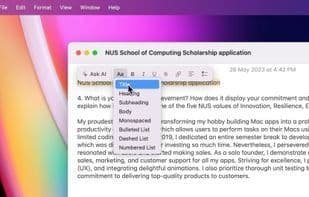
Format Text Quickly
Change font size, bold text, or create checklists without dragging your mouse to the toolbar.
Write in Markdown
Quickly craft headings, checklists, and bullet lists by typing Markdown syntax.
How to use Pronotes?
ProNotes is an extension for Apple Notes that introduces AI, Markdown, and other enhancements to make the note-taking app more enjoyable, improving productivity and writing quality.
Core Functions of Pronotes
AI Writing, AI-Driven
Usage Scenarios of Pronotes
- Use AI to continue sentences or paragraphs, enhancing writing efficiency.
- Quickly summarize notes and extract key information.
- Format text quickly using Markdown syntax or formatting tools, such as adjusting font size, bolding, or creating lists.
- Use slash commands to quickly add or modify content, such as creating headings, lists, or inserting tables.
- View all notes linked to the current note for bidirectional linking.
- Search for notes quickly via the command panel.
Common Questions about Pronotes
What does ProNotes do?
How do I use ProNotes?
What are the core features of ProNotes?
What are the use cases for ProNotes?



















