




Product Information
What is Quickfind?
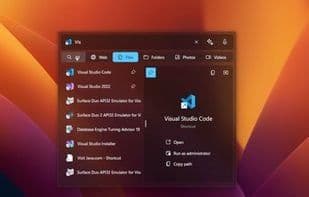
QuickFind is a one-stop solution for instantly finding everything you need. Search files, apps, and webpages through a single easy-to-use interface. Supporting popular search engines and categories (files, photos, music), you can effortlessly switch between local and online content. QuickFind is your essential assistant for quick access to needed information and boosted productivity! Seamlessly access major search engines like Google, Bing, and DuckDuckGo to pull results from local files and the internet instantly. Toggle effortlessly between categories like files, photos, videos, and music for precise results. Whether searching for specific files on your Windows desktop or browsing the latest info online, QuickFind is your all-in-one search solution. Its sleek, minimalist interface keeps you focused, while advanced indexing ensures you find what you need immediately. Ready to 'search like macOS Spotlight' with QuickFind—the ultimate tool for productivity and efficiency. Features: • Unified search interface: Find files, apps, and webpages through one easy-to-use window. • Popular search engine support: Built-in access to Google, Bing, DuckDuckGo, and more for instant online results. • Categories for local and online content: Quickly toggle between files, photos, music, and videos for precise results. • Customizable search settings: Fine-tune settings for accurate searches on devices and online. • Productivity boost: Effortlessly switch between local and web results to save time and improve efficiency. • Advanced indexing: Find what you need immediately with efficient file and data indexing. • Minimalist interface: Simple, intuitive design keeps you focused on search results. • Instant file and app access: Quickly search and open local files and installed apps on Windows.
How to use Quickfind?
QuickFind is a one-stop solution for instantly locating files, apps, and webpages.
Core Functions of Quickfind
File search, application launcher, built-in AI assistant, ChatGPT integration, voice search, unified search
Document search
Application launcher
Built-in AI assistant
ChatGPT integration
Voice Search
Unified search
Built-in AI Assistant
Usage Scenarios of Quickfind
- Find local files, apps, and web pages through a single interface
- Instantly retrieve local files and internet search results using Google, Bing, DuckDuckGo, etc.
- Switch between files, photos, videos, music, etc., for precise search results
- Search for specific files or quickly open installed apps on Windows desktop
- Browse the latest information online
Common Questions about Quickfind
What does QuickFind do?
How do I use QuickFind?
What are the core features of QuickFind?
What are the use cases for QuickFind?



















