




Product Information
What is Sidekickbar?
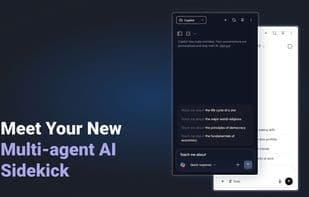
SidekickBar is a versatile desktop application that provides instant access to over 30 AI assistants through a seamless sidebar interface. Designed to integrate effortlessly with your operating system, it enhances productivity by enabling simultaneous interaction with multiple AI tools.
Key Features:
Multi-Agent AI Access: Connect with more than 30 pre-configured AI assistants from leading providers like Microsoft, OpenAI, Anthropic, and Google. You can also add your own local or cloud-based assistants by seamlessly linking existing free or premium accounts.
Parallel Task Execution: Run multiple AI assistants concurrently to boost multitasking and productivity.
Versatile Use Cases: Employ AI assistants for a variety of purposes, including research, translation, multimedia generation, study, and voice assistance. Tailor the experience to your specific needs.
User-Friendly Interface: Features like drag-and-drop file uploads, voice command control, customizable hotkeys, and dark mode enhance usability.
Cross-Platform Compatibility: Available for Windows, macOS, and Linux, with native builds for each platform ensuring optimal performance and integration.
How to use Sidekickbar?
SidekickBar is a versatile desktop app offering instant access to 30+ AI assistants via a seamless sidebar interface, boosting productivity by supporting simultaneous interaction with multiple AI tools.
Core Functions of Sidekickbar
Dark Mode
Text-to-Image Generation
Available Offline
No Tracking
No Coding Required
Ad-Free
Usage Scenarios of Sidekickbar
- Research
- Translation
- Multimedia generation.
- Learning.
- Voice assistance.
Common Questions about Sidekickbar
What does SidekickBar do?
How do I use SidekickBar?
What are the core features of SidekickBar?
What are the use cases for SidekickBar?



















