
Product Information
What is Voice?
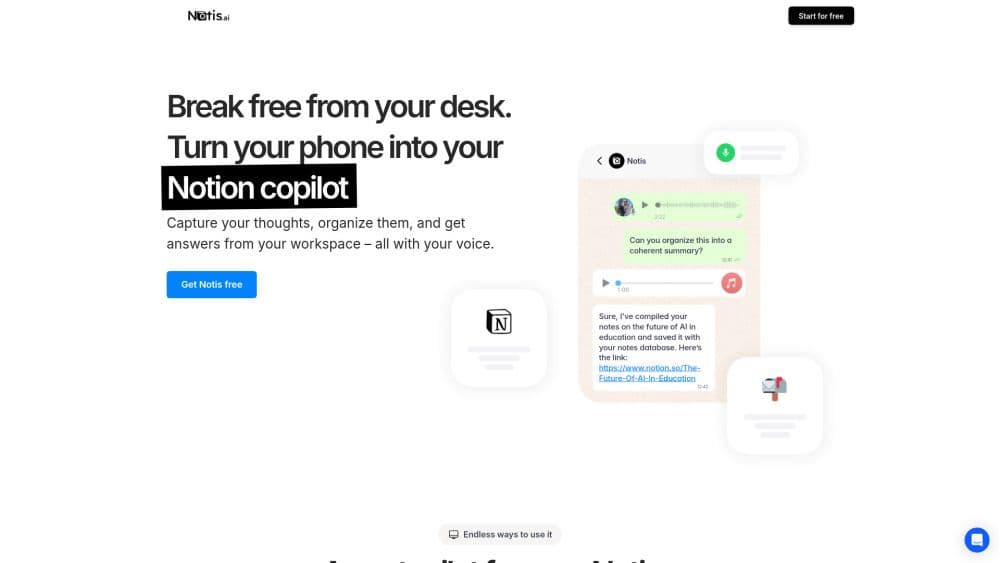
Notis converts voice notes into easy-to-read text and organizes them in your Notion workspace. Create meeting minutes, memos, emails, articles, and more. It's tailor-made for busy individuals who want to get work done even when they're not at their desks.
Notis is like hiring an intern, granting them access to your Notion workspace and delegating tasks via WhatsApp voice messages. Here’s what you can do:
- Jot down vague ideas and let Notis summarize, refine, and organize them for you.
- Record meetings and ask Notis to draft minutes, then send the notes to your email.
- Track all tasks and to-dos. Notis can organize tasks by area, project, location, etc. Simply ask what tasks you can complete at home or what’s left for a project by Friday, and more.
- Transcribe your business cards, expenses, or anything else, and store them properly. Notis understands your Notion databases and can edit any field for you.
- Find any buried information in your Notion and query any database. "What was that tool for converting articles to podcasts again?" "How much did I spend at restaurants during my last business trip to South Africa?"
Notis provides a complete second-brain Notion template to manage every aspect of your life, but it also works with any Notion template or database. You can create endless workflows in your Notion workspace powered by your voice, text, and images—no coding required, just your dedicated AI intern.
How to use Voice?
No usage instructions available, please contact customer service for details
Core Functions of Voice
Transcribe Your Thoughts into Structured Notes
Write Meeting Minutes
Express and Manage Tasks via Voice
Take Photos of Expenses and Business Cards and Track Them in Notion
Copywriting Tailored to Your Unique Tone
Easily Compile a Knowledge Base with Voice Notes
Retrieve Any Information from Your Notion Workspace
Draft Emails, Documents, Blog Posts, etc.
Usage Scenarios of Voice
- Here is the Voice to Notion support email including customer service: [email protected]. For more contact, visit the contact us page().
- Voice to Notion company name: Mind the Flo S.à.r.l.
- Voice to Notion company location: .
- For more about Voice to Notion, visit the about us page().
- Voice to Notion login link:
- Voice to Notion signup link:
- Voice to Notion Youtube link: https://www.youtube.com/@mindtheflo
- Voice to Notion Tiktok link: https://www.tiktok.com/@mindtheflo
- Voice to Notion Twitter link: https://twitter.com/mindtheflo
- Voice to Notion Instagram link: https://www.instagram.com/mindtheflo
Common Questions about Voice
No common questions available, please contact customer service for details