
Product Information
What is MacOS?
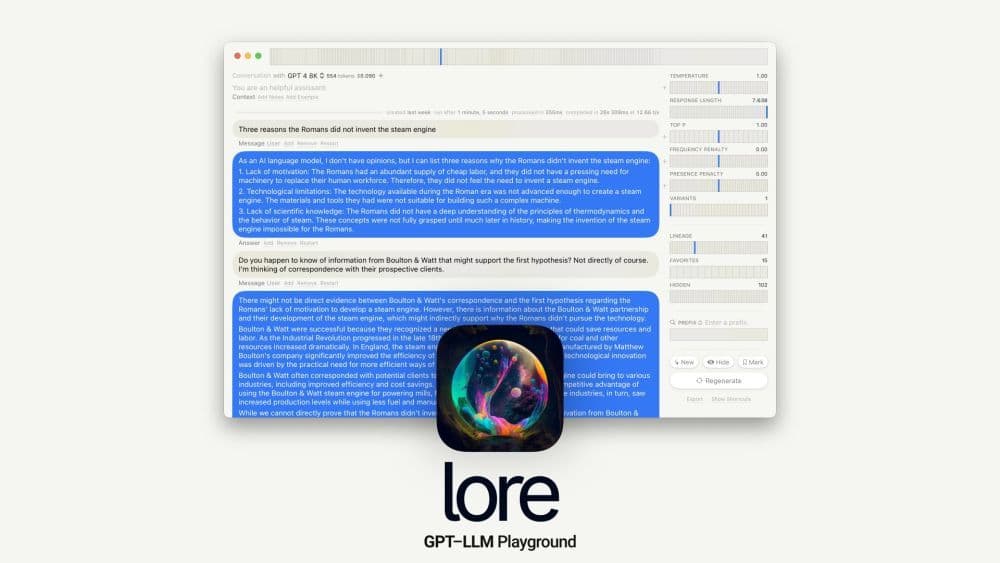
macOS GPT-LLM Playground is a native Mac IDE specifically designed for Prompt Engineering with Time Travel. It offers version control, full-text search, multi-model support, combined runs, variants, model cost awareness, API integration, token statistics, custom endpoints, local models, tables, syntax highlighting, LaTeX support, note exporting, keyboard shortcuts, Vim mode, and a sandbox environment. Built with Cocoa, SwiftUI, and SQLite.
How to use MacOS?
To use the macOS GPT-LLM Playground, simply download and install it on your macOS 13+ device. Launch the IDE and start exploring its various features. You can create and manage prompts, navigate through time travel to view and modify previous versions of your work, use full-text search to find specific content, experiment with multi-model combinations, analyze token statistics, customize API endpoints, work with local models and tables, write code with syntax highlighting or LaTeX support, export notes, speed up navigation with keyboard shortcuts, enjoy a familiar editing experience in Vim mode, and ensure privacy and security within a sandbox environment. If you need any assistance or have feedback, there's a dedicated support and feedback section.
Core Functions of MacOS
Prompt engineering
Time travel
Version Control
Full-Text Search
Multi-model support
Combination runs
Variants
Model cost awareness
API integration
Token statistics
Custom endpoints
Local models
Tables
Syntax Highlighting
LaTeX support
Note export
Shortcut keys
Vim mode
Sandbox environment
Usage Scenarios of MacOS
- Prompt engineering and experimentation
- Develop and modify prompts using time travel
- Enable efficient content search with full-text search
- Explore model combinations with multi-model support
- Analyze and optimize model costs with cost-aware features
- Integrate APIs and customize endpoints
- Analyze token statistics and usage patterns
- Work with local models and tables
- Write code with syntax highlighting and LaTeX support
- Export notes for documentation or sharing
- Boost productivity with shortcuts and Vim mode
- Ensure privacy and security in a sandbox environment
Common Questions about MacOS
How can I download macOS GPT-LLM Playground?
What are some core features of macOS GPT-LLM Playground?
Can I customize API endpoints in macOS GPT-LLM Playground?
Does macOS GPT-LLM Playground have a support system?
Does macOS GPT-LLM Playground ensure privacy and security?
Can I export my notes from macOS GPT-LLM Playground?
Does macOS GPT-LLM Playground support Vim mode for editing?
What is prompt engineering?
What is time travel in macOS GPT-LLM Playground?