




Product Information
What is Adblock plus?
Adblock Plus is a free extension that allows you to, among other things, block annoying ads, disable tracking, and block domains known to distribute malware.
Available for Chrome, Firefox, Internet Explorer, Maxthon, Opera, Safari, and Yandex, Adblock Plus uses filters of your choice to block all unwanted elements.
The Adblock Browser is a mobile web browser with Adblock Plus built-in, also available for Android and iOS.
By default, Adblock Plus does not block all ads automatically. However, it does remove third-party ads unless they are included on our whitelist by our parent company, Eyeo.
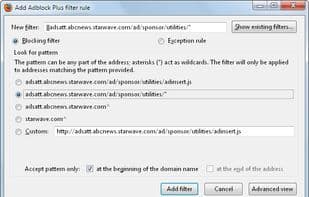
Adblock Plus requires users to "tell" it what to block by adding external filter lists. These filter lists are essentially a broad set of rules that instruct Adblock Plus which website elements to block. By default, all blocklists are enabled with our standard whitelist in place.
You can add any filter list you want—for example, to block tracking or malware. You can also create your own filter lists. Nearly all filters are open-source, which is why internet users have created numerous filter lists.
You can "opt out" by manually disabling our unblock whitelist.
The filter lists enabled by default include:
- An ad-blocking list selected based on your language (EasyList)
- The Acceptable Ads list
These are designed to get you started. You can remove them or add others—it's entirely up to you.
EasyList corresponds to your browser's language and is designed to disable ads that our user community finds intrusive. Eyeo GmbH did not draft EasyList and therefore has no authority over its content or control beyond our default global whitelist. Visit the EasyList community for more information.
The Acceptable Ads whitelist displays ads that meet the Acceptable Ads criteria. This list is maintained by Eyeo GmbH.
How to use Adblock plus?
Adblock Plus is a free browser extension and mobile browser that blocks annoying ads, disables tracking, and stops malware domains for cleaner, faster, safer browsing.
Core Functions of Adblock plus
Privacy-Focused
Lightweight
Browser Extension
Microsoft Edge extension
Ad-Free
No tracking
Usage Scenarios of Adblock plus
- Block annoying ads like pop-ups, video ads, and banners.
- Disable online tracking to protect user privacy and prevent companies from tracking activities.
- Block domains known for spreading malware to reduce 'malvertising' risks.
- Prevent ad interruptions when watching videos on sites like YouTube.
- Block annoying cookie banners and website notifications (advanced feature).
- Customize filter rules to allow or block ads on specific websites.
Common Questions about Adblock plus
What does Adblock Plus do?
How do I use Adblock Plus?
What are the core features of Adblock Plus?
What are the use cases for Adblock Plus?
















