




Product Information
What is Add to sheets?
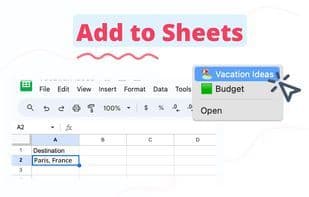
Right-click to add anything to your Google Sheets. Additionally, find all emails, links, and images on a website, then save them directly to your sheet. Save hours of manual copying and pasting. Instead, right-click and save content straight into your Google Sheets spreadsheet.
Right-click and add any content to a pre-selected column in Google Sheets, eliminating manual copying, pasting, and switching between tabs. **Add to Sheets** is perfect for:
📝 **Saving notes from emails**
Directly store important details like contact information, addresses, and meeting notes into your Google Sheets. Works seamlessly with web-based email clients like Gmail.
🔎 **Find all email addresses, links, and images (Premium feature)**
Easily locate all email addresses, links, and image URLs on a website and save all matches directly to your Google Sheets in seconds.
💍 **Wedding planning**
Effortlessly manage guest details, track RSVPs, and save vendor contacts. Store inspiration images and links from social media and wedding websites.
💰 **Budget tracking**
Monitor your spending by quickly adding prices and details of online purchases to your budget spreadsheet.
✈️ **Travel planning**
Organize your trip details—flights, accommodations, and activities—by saving information directly from travel sites like Google Flights and Airbnb.
💪 **Fitness progress tracking**
Save workout routines, nutrition plans, and progress updates from fitness websites for easy tracking.
🍜 **Recipe collection**
Create a digital cookbook by saving recipes from cooking sites directly to your Google Sheets.
🛍 **Personal shopping**
Compare products and prices by adding details from different online stores into a single spreadsheet for easy access.
🤳 **Social media & event organizing**
Keep all event-related info—social media post ideas, venue options, catering menus, and guest lists—in one organized sheet.
🎉 **Content saving**
Store useful articles, interesting quotes, and web content for later reading or reference.
📊 **CRM for sales professionals**
Save profiles, emails, leads, and key contact details directly into a CRM spreadsheet.
How to use Add to sheets?
Add to Sheets is a Chrome extension designed to automate data collection and save time on manual copy-pasting by allowing users to save any content from web pages (text, links, images, etc.) directly into Google Sheets with just a right-click.
Core Functions of Add to sheets
Google Sheets integration
Usage Scenarios of Add to sheets
- Save important email information like contacts and meeting notes.
- Manage wedding details, including guest info, RSVPs, and vendor contacts.
- Track budgets by quickly adding online shopping prices and details.
- Organize travel details like flights, accommodations, and activity info.
- Create a digital recipe collection by saving cooking site recipes to Google Sheets.
- Quickly save client profiles, emails, and lead info to CRM sheets for sales professionals.
Common Questions about Add to sheets
What does Add to Sheets do?
How do I use Add to Sheets?
What are the core features of Add to Sheets?
What are the use cases for Add to Sheets?
















