




Product Information
What is Big tech detective?
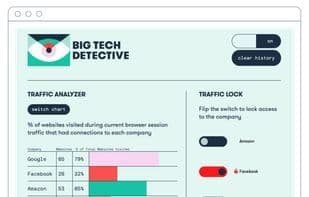
As you browse the internet, Big Tech Detective will identify and measure connections to internet protocol (IP) addresses owned by Amazon, Facebook, Google, and Microsoft, revealing which websites exchange data with them. When a webpage exchanges data with any of these four companies, an overlay will alert you. Even if you don't block traffic to these companies, the extension counts connections and displays the percentage of websites with connections to each company in the 'Website View' of the traffic analyzer graph. Switch to 'Packet View' to see a breakdown of data volume sent to each company. To inspect IP addresses on each webpage, toggle the lock switch for a company and click 'Copy Data to Clipboard' to pull back the curtain further. Think of this tool as X-ray vision for websites, revealing their inner workings. While you might be used to seeing ads in sidebars, this tool shows Big Tech's role in delivering them. It may also reveal their role in hosting your favorite sites. Big Tech Detective tracks our best guess of what's controlled by these companies based on domain ownership. You can stop tracking by closing the app popup. To identify, label, and count connections, the app tracks requested URLs, company ownership, and packet counts. All data is stored locally and contains no identifying information beyond packet counts sent to tech giants by your browser.
How to use Big tech detective?
Big Tech Detective is a Chrome browser extension designed to track and prevent data exchanges with tech giants by identifying and measuring connections to IP addresses owned by Amazon, Facebook, Google, and Microsoft while users browse the internet. It helps users understand the flow of data between websites and major tech companies, revealing their roles in ad delivery and website hosting.
Core Functions of Big tech detective
Block Trackers
Shield Trackers
Usage Scenarios of Big tech detective
- While browsing the web, monitor in real-time whether websites exchange data with Amazon, Facebook, Google, or Microsoft.
- View the IP addresses being pinged on a specific webpage to gain in-depth insights into data exchange details.
- Analyze the role tech giants play in website ad placements.
- Identify the role of tech giants in hosting commonly used websites.
- Understand the percentage of websites connected to various tech companies through 'Website View'.
- View the breakdown of data volume flowing to various tech companies through 'Packet View'.
Common Questions about Big tech detective
What does Big Tech Detective do?
How do I use Big Tech Detective?
What are Big Tech Detective's core features?
What are Big Tech Detective's use cases?
















