




Product Information
What is Block site extension?
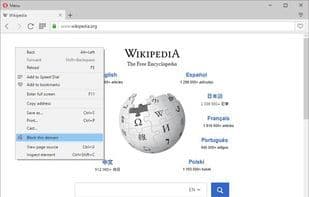
The Block site is a browser extension that helps you block any website you desire. To use it, simply right-click on any webpage and select the "Block this site" option from the context menu. The site will then be added to your block list. Please note that the entire domain will be blocked, not just the specific URL. To modify this list, open the options page and remove any entries as needed.
For any blocked domain, you can also set a redirect URL in the options page. Instead of blocking the page entirely, the website will be redirected to the URL of your choice.
How to use Block site extension?
Block Site Extension is a browser add-on that blocks distracting websites to boost focus during work or study, with customizable blocklists and URL redirection.
Core Functions of Block site extension
Browser Extension
Web Page Filter
Opera extension
Website Blocking
Opera Extension
Website blocking
Usage Scenarios of Block site extension
- Block distracting websites to enhance personal productivity.
- Redirect blocked websites to a preset URL instead of displaying a block page.
- Block specific iframe content on web pages.
Common Questions about Block site extension
What does Block Site Extension do?
How do I use Block Site Extension?
What are the core features of Block Site Extension?
What are the use cases for Block Site Extension?
















