




Product Information
What is Canvas defender?
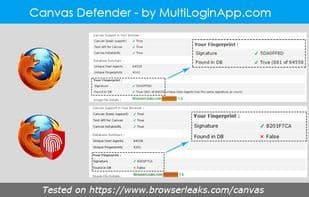
When you browse the internet, the websites you visit can attempt to take a screenshot of your computer as a unique digital 'fingerprint' of you and your device, based on pixel uniqueness. This is called canvas fingerprinting. Even if you're browsing anonymously, such as behind a VPN or using the TOR network. Canvas Defender is a Firefox add-on that attempts to defeat such tracking by adding random noise to the screenshot. This has no impact on your online experience. The add-on differs from others in that it doesn't try to block fingerprinting entirely but rather to confuse it. The Canvas Defender add-on doesn't completely block canvas fingerprinting but generates unique and persistent noise that can hide your real canvas fingerprint. This add-on can protect you while browsing in both normal and private modes.
How to use Canvas defender?
Canvas Defender is a Firefox browser extension that fights online tracking by adding random noise to screen captures to obfuscate digital fingerprints, protecting user privacy.
Core Functions of Canvas defender
No tracking, browser extension
No tracking, browser extension
Usage Scenarios of Canvas defender
- Combat online tracking via canvas fingerprinting.
- Protect user privacy in normal browsing mode.
- Protect user privacy in private browsing mode.
- Obfuscate digital fingerprints to prevent website identification of user devices.
Common Questions about Canvas defender
What does Canvas Defender do?
How do I use Canvas Defender?
What are the core features of Canvas Defender?
What are the use cases for Canvas Defender?
















