




Product Information
What is Carrylinks?
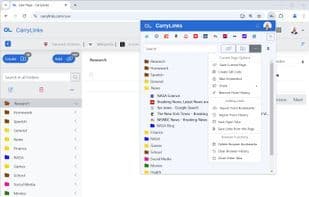
In addition to bookmark synchronization, CarryLinks offers a powerful suite of features designed to help you efficiently manage and access your saved links:
Bookmark and organize links
Import existing bookmarks
Import links from browsing history
Save all open tabs
Capture links directly from webpages
AI-powered summaries
Open all links within a folder
Flexible link-opening options—open links in the same window, a new window, or incognito mode
Search through your links
Generate QR codes
Save links from QR codes
Take screenshots
Shorten URLs
Check link availability
Verify link safety
Share links
Sort links and folders
Color-code folders
CarryLinks works seamlessly across all browsers and devices, making it the ultimate tool for bookmark management.
How to use Carrylinks?
CarryLinks is a comprehensive cross-platform bookmark manager designed to help users efficiently save, organize, and access their links. It goes beyond traditional bookmark syncing to offer seamless bookmark management across all browsers, devices, and systems.
Core Functions of Carrylinks
Privacy-Focused
Lightweight
Support Themes
User-friendly
Customizable
Sorting
Privacy-focused, lightweight, theme-supportive, user-friendly, customizable, sortable
Usage Scenarios of Carrylinks
- Import links from bookmarks or browser history.
- Save all open tabs with one click.
- Save links directly from web pages.
- Sync bookmarks across devices and browsers.
- Access and manage bookmarks offline via progressive apps.
- Create or save links from QR codes.
Common Questions about Carrylinks
What does CarryLinks do?
How do I use CarryLinks?
What are the core features of CarryLinks?
What are the use cases for CarryLinks?
















