




Product Information
What is Chrono download manager?
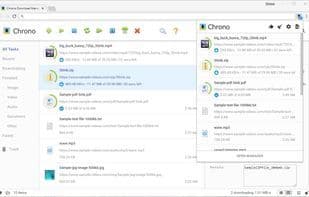
Chrono Download Manager is the first (and only) full-featured download manager specifically designed for Google Chrome. All your download management happens within the browser, not as a separate download management application. Chrono seamlessly integrates with Chrome through context menus, toolbar buttons, and keyboard shortcuts.
Beyond download management, Chrono also serves as your best video/image download assistant. The Chrono Sniffer detects all links, images, audio, and videos on a webpage, allowing you to filter by file type or use regex matching to pinpoint resources of interest.
Features:
- Seamlessly takes over downloads in Google Chrome.
- Browse downloads anytime with a single click from the popup list.
- Customizable filters for grouping downloads by type, date, etc.
- Naming masks intelligently determine filenames from task attributes.
- Rule system to automatically route files to different folders.
- Batch descriptor for downloading URLs with patterns.
- Desktop notifications and sound alerts.
Easy, efficient, customizable, smart, and completely free!
How to use Chrono download manager?
Chrono Download Manager is a full-featured download manager for Google Chrome, handling all downloads within the browser without a separate desktop app. It also detects and downloads videos, images, audio, and more with Chrono Sniffer.
Core Functions of Chrono download manager
Image downloader
YouTube downloader
Browser Extension
Video download
Usage Scenarios of Chrono download manager
- Seamlessly take over and manage download tasks in Google Chrome.
- Use Chrono Sniffer to detect and download videos and images from web pages.
- Group downloads by type, date, etc., with customizable filters.
- Intelligently determine downloaded file names using naming masks.
- Automatically route files to different folders with a rule system.
- Download multiple URL files with specific patterns using batch descriptors.
Common Questions about Chrono download manager
What does Chrono Download Manager do?
How do I use Chrono Download Manager?
What are the core features of Chrono Download Manager?
What are the application scenarios of Chrono Download Manager?
















