




Product Information
What is Currenzy?
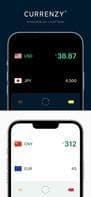
Currenzy (formerly known as Stack) is unlike any currency converter app you've seen before. It leverages the latest Safari Web Extensions to convert prices on web pages into your desired currency. Additionally, it utilizes Apple's Vision Framework technology to detect currency information in images. This means you can use your iPhone camera to convert prices on tags or hotel menus while traveling abroad.
With Currenzy, you can convert currencies anywhere on your iPhone or iPad where text selection is shareable. When using apps like Mail or Notes, simply select the text and share it with the Currenzy app extension to view the conversion. Privacy-conscious by design, none of your data leaves your device.
• Supports all major currencies (over 150 global currencies, including digital currencies like BTC and ETH).
• Safari Extension support – enables currency conversion directly in your browser.
• Action Extension support for converting currencies in any app that allows text selection.
• Home Screen Widget.
• Apple Watch compatibility.
• Bookmark lists.
• Historical charts.
• Built-in calculator.
• Personalized actions – customize exchange rates, transaction fees, etc.
• Supports custom exchange rates.
• Works offline without an internet connection.
• Dark/Light mode with multiple color schemes.
• Dynamic Type support.
• Functional and user-friendly.
• Clean interface with intuitive gestures.
• Universal app – works on iPhone, iPad, and Apple Watch.
• Localized in French, German, Italian, Japanese, Simplified Chinese, and Spanish.
For feedback or suggestions, please email us at [email protected].
How to use Currenzy?
Currenzy is a currency conversion app utilizing Safari extensions for webpage price conversion and Apple's Vision framework to detect currency info in images. Users can convert currencies via text selection and sharing across apps on iPhone/iPad, prioritizing privacy.
Core Functions of Currenzy
Currency conversion, Safari extension, iOS widget
Currency Conversion
Safari extension
iOS widget
Usage Scenarios of Currenzy
- Convert product prices using Safari extensions on the web
- Scan price tags with an iPhone camera to convert prices while traveling abroad
- Scan hotel menus with an iPhone camera to convert prices while traveling abroad
- Select text in apps like email or memos for currency conversion
Common Questions about Currenzy
What does Currenzy do?
How do I use Currenzy?
What are the core features of Currenzy?
What are the use cases for Currenzy?
















