




Product Information
What is Cyclonis password manager?
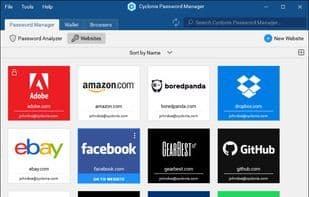
Cyclonis Password Manager is available for Windows and MacOS, offering users the opportunity to organize and easily access their sensitive data. All information stored in Cyclonis Password Manager is encrypted using AES-256 and then placed in a vault that can only be unlocked with a master password chosen by the user. Users then have the option to store their vault either on their computer's hard drive or in one of their cloud storage accounts, such as Dropbox, Google Drive, Apple iCloud, or Microsoft OneDrive. Beyond this, Cyclonis Password Manager comes equipped with numerous features designed to save time and streamline the way people handle their daily online tasks.
How to use Cyclonis password manager?
Cyclonis Password Manager is a cross-platform password management tool designed to help users organize and easily access sensitive data. It protects information with AES-256 encryption and offers local or cloud storage options, simplifying daily online tasks and enhancing user experience.
Core Functions of Cyclonis password manager
Microsoft Edge extension
Autofill
Private notes
Safari extension
Microsoft Edge extension, autofill, private notes, Safari extension
Usage Scenarios of Cyclonis password manager
- Securely store and manage login credentials for hundreds of websites.
- Unlock encrypted personal data vaults with a master password.
- Choose to store encrypted data locally or on cloud services like Dropbox or Google Drive.
- Sync and access passwords across Windows, macOS, Android, and iOS devices.
- Simplify daily online tasks without needing to remember numerous passwords.
Common Questions about Cyclonis password manager
What does Cyclonis Password Manager do?
How do I use Cyclonis Password Manager?
What are the core features of Cyclonis Password Manager?
What are the use cases for Cyclonis Password Manager?
















