




Product Information
What is Download manager?
Features:
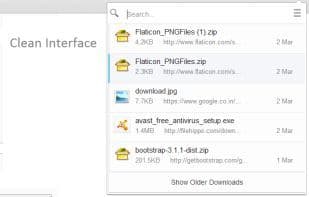
Nice, clean interface that allows easy access and viewing of your download information in a popup.
Right-click context menu for each action on download items (see screenshot).
Search your downloads instantly as you start typing.
Display pause, resume, and cancel options for download progress.
Drag and drop items onto the application.
Desktop notifications upon download completion.
Visual notifications when downloads start.
Show remaining download time and progress within the icon itself.
Disable the bottom download shelf.
Keyboard shortcuts for each option.
Permissions:
Downloads => Access the download list
Downloads => Open downloads
downloads.shelf => Disable Chrome's default download bar
Clipboard => Copy download links to the clipboard
Notifications => Create desktop notifications upon download completion
activetab => Display download start notifications in the active tab
allTabs and browsing history => Render download start notifications in the current tab
How to use Download manager?
Download Manager is a Chrome extension offering a clean, efficient interface to quickly manage and view downloads with rich interactive features.
Core Functions of Download manager
Browser Extension
Usage Scenarios of Download manager
- Easily access and view download info in pop-ups.
- Pause, resume, or cancel downloads via right-click menu.
- Instantly search download history by entering keywords.
- Drag and drop downloaded files directly into other apps for use.
- Receive visual or desktop notifications when downloads start and finish.
- Use keyboard shortcuts for quick download management.
Common Questions about Download manager
What does Download Manager do?
How do I use Download Manager?
What are the core features of Download Manager?
What are the application scenarios for Download Manager?
















