




Product Information
What is Downthemall?
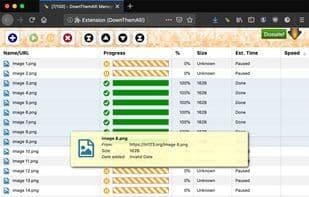
DownThemAll (or Just DTA) is a powerful yet easy-to-use browser extension for Firefox, Chrome, and Opera that adds new advanced downloading capabilities to your browser. DownThemAll allows you to download all links or images contained in a webpage, among other things: you can refine your downloads with fully customizable criteria to get only what you truly want.
How to use Downthemall?
DownThemAll is a powerful browser extension for Firefox, Chrome, and Opera, offering advanced downloading capabilities to easily download all links or images on a page with custom filters, faster speeds, and support for queues, pauses, and resumes.
Core Functions of Downthemall
Privacy-Focused
Customizable
Browser integration
Download accelerator
Image downloader
Segmented downloads
Usage Scenarios of Downthemall
- Bulk download all links or images from a webpage.
- Filter and download content based on custom criteria.
- Download Zoom meeting recordings.
- Download media files from all open browser tabs.
- Filter downloads by file extension or regex to handle sites with junk files.
Common Questions about Downthemall
What does DownThemAll do?
How do I use DownThemAll?
What are the core features of DownThemAll?
What are the application scenarios for DownThemAll?
















