




Product Information
What is Draw-on-screen?
Draw, highlight, and annotate on any webpage - the easiest way to comment while browsing!
How to use Draw-on-screen?
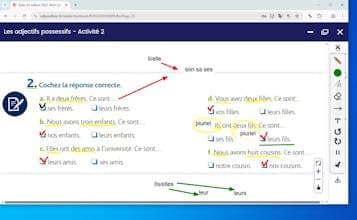
Draw on Screen is a browser extension that allows users to draw, highlight, and annotate on any webpage, as well as take screenshots to share, enhancing interactivity and efficiency during browsing.
Core Functions of Draw-on-screen
Freehand Drawing and Highlighting Web Content
Adjust Multiple Colors and Brush Sizes
Draw Shapes Like Rectangles, Circles, Lines, and Arrows
Add Text Annotations Directly on Pages
Support Undo and Redo Actions
Instantly Capture Annotated Pages
Usage Scenarios of Draw-on-screen
- Students and educators annotate learning materials or take notes
- Designers and developers provide clear visual feedback
- Business professionals effectively mark reports, presentations, and proposals
- Creative individuals quickly sketch ideas and visually communicate concepts
Common Questions about Draw-on-screen
What does Draw on Screen do?
How do I use Draw on Screen?
What are the core features of Draw on Screen?
What are the use cases for Draw on Screen?
















