




Product Information
What is Fake filler?
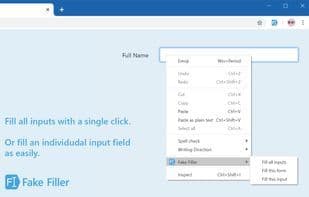
Fill all form inputs on the page with fake/dummy data.
The purpose of this extension is to assist developers and testers in quickly and easily testing forms.
This extension allows you to populate all form inputs (text boxes, text area buttons, dropdown menus, etc.) with random/dummy data.
For developers and testers working with forms, this extension is essential as it eliminates the need to manually enter values into fields.
Fill all text boxes in the form.
Support for the MaxLength attribute.
Randomly select radio buttons, dropdown menus, and checkboxes.
Ignore CAPTCHAs, hidden, disabled, and read-only fields.
Support for generating dummy data based on regular expressions.
How to use Fake filler?
Fake Filler is a browser extension designed to help developers and testers quickly and easily fill all form inputs on a webpage with fake/dummy data, saving time on manual input.
Core Functions of Fake filler
Browser Extension
Browser extension
Usage Scenarios of Fake filler
- Developers and testers quickly test web forms.
- Automatically fill in dummy data when developing or testing apps with numerous forms.
- Save time by avoiding manual repetition of lengthy form entries.
- Use as part of daily web development work to populate forms.
Common Questions about Fake filler
What does Fake Filler do?
How do I use Fake Filler?
What are the core features of Fake Filler?
What are the use cases for Fake Filler?
















