




Product Information
What is Finder bookmarks?
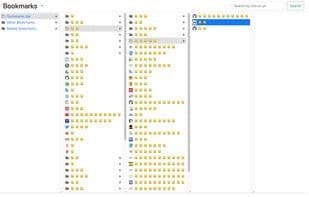
A bookmark manager like MacOS Finder.
Version 1.0.7 Update: Supports dark theme (in the top-left menu?)!
This extension replaces Chrome's default bookmark manager. It's incredibly useful if you have a lot of bookmarks. Similar to the Mac Finder in column view, you can manage and navigate bookmarks using either the mouse or keyboard shortcuts:
• Browse all bookmarks with the mouse or arrow keys.
• Open a bookmark by double-clicking or pressing the Enter key.
• Open all bookmarks in a folder via the context menu.
• Drag bookmarks to new locations.
• Create, edit, or delete bookmarks or folders through the context menu.
• Select multiple bookmarks to move, delete, or open.
• Copy/cut/paste bookmarks (except folders) via shortcuts.
• Supports numerous keyboard shortcuts.
How to use:
• Click this extension's icon
• Select the menu item in Chrome → Bookmarks → Bookmark Manager
• Use Chrome's keyboard shortcut: Ctrl + Shift + O for Windows/Linux, or ⌘ + Option + B for Mac
Bookmark Menu (?)
• Toggle dark/light theme
• Display keyboard shortcuts or press the '?' key
This extension is part of another extension called "re-newtab," which includes this bookmark manager within Chrome's New Tab page.
How to use Finder bookmarks?
Finder Bookmarks is a Chrome extension that replaces the default bookmark manager with a macOS Finder-like column view, ideal for users with many bookmarks to organize and navigate efficiently.
Core Functions of Finder bookmarks
Dark Mode
Extendable via Plugins/Extensions
Bookmark
Browser extension
Usage Scenarios of Finder bookmarks
- Navigate and manage large numbers of bookmarks efficiently.
- Operate bookmarks via mouse or keyboard shortcuts.
- Move, delete, or open multiple bookmarks in bulk.
- Create, edit, and delete bookmarks or folders.
- Switch between dark/light theme interfaces.
Common Questions about Finder bookmarks
What does Finder Bookmarks do?
How do I use Finder Bookmarks?
What are the core features of Finder Bookmarks?
What are the application scenarios for Finder Bookmarks?
















