




Product Information
What is Form vault?
Form Vault enables you to save form templates from any webpage and recover lost form data. You can also fill out timesheets, job applications, and other frequently completed forms with just one click! If you've ever had one of those *#@! moments where everything you typed into an online form was lost, this extension is perfect for you. If not, use this extension to prevent such situations!
Current Features:
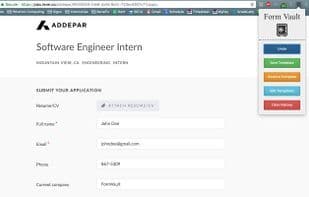
- The "Undo" button restores auto-saved data for a specific site. This data is stored locally in your Chrome browser.
- The "Save Template" button creates a template of the current website's form data. This data will persist offline and across different devices as long as the user has "Sync" enabled in their Chrome browser. Note: This button will overwrite any previously saved template.
- The "Restore Template" button retrieves the template saved for the website's domain and populates the form fields with the template data.
- The "Edit Template" button opens a new webpage displaying a table of all currently saved templates by the user. From this page, users can edit or delete templates.
- The "Clear History" button removes all history—both templates and auto-saved data. This data cannot be recovered.
- Works with all text elements, dropdown selections, radio buttons, and checkboxes.
Note: This extension does not save any personal data. All data is either stored locally on your computer or synced with your Gmail account. Additionally, the extension does not save or restore any fields labeled as "password" or similar.
How to use Form vault?
Form Vault is a browser extension that automatically saves user inputs in web forms for easy recovery of lost data and allows the creation of form templates for one-click filling of frequently used forms.
Core Functions of Form vault
Browser Extension
Auto-save
Browser Extension, Auto-Save
Usage Scenarios of Form vault
- Recover lost online form data due to unexpected circumstances.
- Quickly fill out timesheets.
- Quickly fill out job applications.
- One-click fill for frequently used forms.
Common Questions about Form vault
What does Form Vault do?
How do I use Form Vault?
What are the core features of Form Vault?
What are the application scenarios of Form Vault?
















