




Product Information
What is Foxytab?
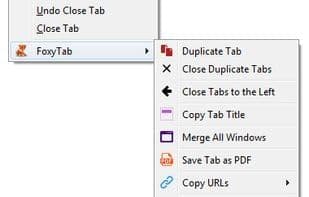
FoxyTab is a compact extension that enhances the tab context menu with counters, country flags, and multilingual date and time displays, while adding a plethora of tab-related operations.
Features:
- Bookmark
- Capture
- Clean URL (removes tracking/redirect strings from tab URLs)
- Close bookmarked tabs
- Close duplicate tabs
- Close other windows
- Container (set mode to automatically open tabs in containers)
- Copy (title, URL, IP, custom)
- Create desktop shortcut
- Date and Clock (multilingual and multi-timezone toolbar popup)
- Discard
- Editable context menu (enable, disable, rearrange)
- Hide and Show
- Host (keep, close, close others, move to new window, reload)
- Keyboard shortcuts
- Merge all windows
- Move (to new or private window)
- Pin and Unpin
- Print
- Redirect (set custom rules to redirect tabs)
- Reload (group, 1-5 minutes, custom intervals)
- Save tab as PDF
- Select matches based on regular expressions
- Show flags (IP location and country flags; uses internal database)
- Sort (by URL, title, last accessed, reverse; ascending or descending)
- Tab counter (with customizable colors and background)
- Theme (create your own Firefox theme)
How to use Foxytab?
FoxyTab is a browser extension that enriches the tab context menu with numerous relevant actions and offers features like a tab counter, country flags, and multilingual date-time display, designed to enhance tab management and information presentation.
Core Functions of Foxytab
Theme Support
Customizable
Browser Extension
Split tabs
Keyboard Shortcuts
Customizable themes
Support Themes
Split-screen tabs
Usage Scenarios of Foxytab
- Manage and organize browser tabs, such as closing duplicates, merging all windows, or sorting by specific criteria.
- Quickly obtain tab information, such as viewing IP location, country/region flags, and tab counts.
- Customize tab behavior, such as setting tabs to automatically open in specific containers or creating redirect rules.
- Perform specific actions, such as saving tabs as PDFs or creating desktop shortcuts.
- Personalize the browser interface, such as creating your own Firefox theme or editing the context menu.
- Clean URLs by removing tracking or redirect strings.
Common Questions about Foxytab
What does FoxyTab do?
How do I use FoxyTab?
What are the core features of FoxyTab?
What are the application scenarios for FoxyTab?
















