



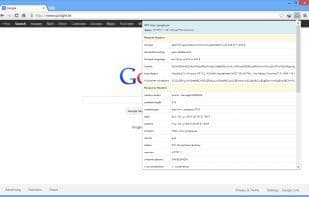

Product Information
What is Http headers?
Quickly view the HTTP Headers of the current tab. HTTP Headers allows you to swiftly examine the HTTP header information of the current URL.
This extension might be helpful if you're interested in:
- Debugging web applications
- Following redirect paths
- Viewing cookies sent by remote websites
- Identifying which web server the remote site is using
- Reviewing headers sent to the server
- Checking headers returned by the server
- Seeing the HTTP verb used
- Observing the response code
This extension displays the headers as they are sent when you visit the page you're viewing. Unlike some other extensions, it doesn't make a second request.
Additionally, you don't need to reload the page to see the HTTP Headers. This is useful in scenarios where random errors occur, or if you're a website owner or web developer wanting to quickly inspect the current HTTP request and response.
Developers often want to sniff out the remaining headers, as header information is usually more critical than the body. HTTP Headers provide a wealth of information that helps identify the technology in use (Rails on Ruby, ASP.NET, PHP, JBOSS, etc.), whether the page is cached, the encoding, and much more.
For example, you can obtain details about the server, content encoding, content type, content length, expiration date, cache control, X-Powered-By, X-Version, X-Cache, X-SPNet-Version, X-XSS-Protection, X-Content-Security-Policy, and many others.
You can also see verbs such as GET, POST, HEAD, DELETE, PUT, and more.
How to use Http headers?
HTTP Headers is a browser extension that enables users to quickly view the HTTP header information of the current URL, aiding in debugging web applications, analyzing request responses, and identifying website technologies.
Core Functions of Http headers
HTTP(S) debugging
HTTP proxy
HTTP monitoring
Web debugging
Usage Scenarios of Http headers
- Debug web applications
- Trace redirect paths
- View cookies sent by remote sites
- Identify the web server used by remote sites
- Website owners or web developers quickly view current HTTP requests and responses
- Developers sniff REST header information
Common Questions about Http headers
What does HTTP Headers do?
How do I use HTTP Headers?
What are the core features of HTTP Headers?
What are the application scenarios of HTTP Headers?
















