




Product Information
What is Instant data scraper?
How to use it:
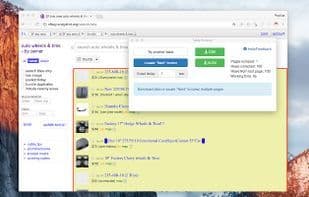
1. Open the first page of the list results (products, catalog, etc.) in your browser.
2. Activate the extension.
3. The extension will guess where your data is. If not satisfied, use the "Try another table" button to guess again.
4. If needed, download the CSV or Excel from the first page. Or click to locate the "Next" button to mark the "Next" link/button on the website.
5. Click "Start Crawling" to begin crawling multiple pages on the website. The extension will display statistics about what is being collected.
6. Download the Excel or CSV file at any time during the crawl.
7. Clean up the Excel or CSV file—it’s likely that some unwanted additional fields were extracted from the pages. You may also need to rename the column headers.
How to use Instant data scraper?
Instant Data Scraper is a browser extension that uses AI to automatically identify and extract list-type data from web pages. This tool requires no coding, helping users easily obtain the data they need and export it to Excel or CSV files.
Core Functions of Instant data scraper
No coding, data mining, screen scraping
Usage Scenarios of Instant data scraper
- Opening the Product Listing Page in a Browser and Activating the Extension to Scrape Data
- Extracting Information from Directory Pages
- Marking the 'Next Page' Button to Scrape Multiple Pages on a Website
- Scraping and Monitoring Online Retail Items, Prices, and Inventory
- Collecting Real Estate Listings and Rental Price Datasets
- Aggregating Travel-Related Air, Ground Transport, and Hotel Pricing and Review Data
Common Questions about Instant data scraper
What does Instant Data Scraper do?
How do I use Instant Data Scraper?
What are the core features of Instant Data Scraper?
What are the use cases for Instant Data Scraper?
















