




Product Information
What is Ipvfoo?
Display the current page's IP version (4 or 6) and address in Chrome and Firefox.
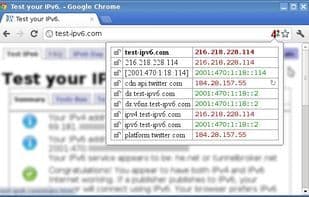
When the mouse cursor hovers over the number, the page's IP address pops up. When clicked, the number shows the current page's address along with other elements of the page (images, styles, etc.).
How to use Ipvfoo?
IPvFoo is a browser extension designed to display the current webpage's IP version (IPv4 or IPv6) and its address in Chrome and Firefox, helping users quickly understand the connection information of the webpage.
Core Functions of Ipvfoo
Supports IPv4, supports IPv6
Supports IPv4
Supports IPv6
Usage Scenarios of Ipvfoo
- Quickly identify the IP protocol version (IPv4 or IPv6) used by a webpage.
- Hover over the IP version number in the URL bar to view the current webpage's IP address.
- Click the IP version number in the URL bar to display detailed IP addresses of the current page and its components (e.g., images, styles).
Common Questions about Ipvfoo
What does IPvFoo do?
How do I use IPvFoo?
What are the core features of IPvFoo?
What are the application scenarios of IPvFoo?
















