




Product Information
What is Power tabs?
A reimagining of the old tab group extension combined with vertical tabs.
To enable tab hiding, you must use Firefox 59.0b3 or later and configure the extension.
**Features**
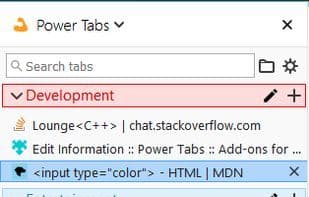
- View tabs vertically via the sidebar.
- Automatically hide tabs that do not belong to the active group.
- Powerful quick switcher for keyboard navigation to fuzzy-search tabs.
- Right-click context menus on tabs and groups for actions.
- See which tabs are actually discarded.
- Sort tabs within groups by URL or title (by right-clicking a group in the sidebar).
- Assign a domain to always open in a specified group.
For feature requests and suggestions, visit the GitHub page.
How to use Power tabs?
Power Tabs is a Firefox browser extension that reimagines the old Tab Groups extension with vertical tab functionality, aiming to provide a more efficient tab management and search experience.
Core Functions of Power tabs
Group tabs
Tab manager
Tabbed Browsing
Usage Scenarios of Power tabs
- View and manage multiple tabs vertically in the sidebar.
- Automatically hide tabs not in the current active group to keep the browser interface tidy.
- Use the keyboard quick switcher to fuzzy search and navigate to specific tabs.
- Sort tabs within a tab group by URL or title for easy finding.
- Assign specific domains to designated tab groups to ensure related sites always open in predefined groups.
Common Questions about Power tabs
What does Power Tabs do?
How do I use Power Tabs?
What are the core features of Power Tabs?
What are the application scenarios for Power Tabs?
















