




Product Information
What is R&s browser in the box?
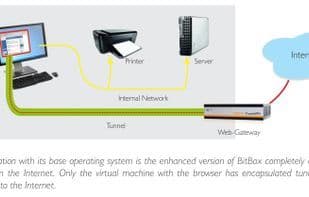
Secure and Comfortable Virtual Environment for Web Browsing: Based on the "browser within a browser" concept, the virtual machine consists of a minimized operating system and a web browser encapsulated within it. Malware is thus unable to penetrate the host operating system, as each launch of the browser in the isolated virtual machine disappears by reverting to a verified starting point—all completely transparent to the user.
Preventing Malware and Data Leakage
Unlike the simple sandbox approach offered by standard browsers, Bit Box isolates all browser activities entirely from the host operating system. Only a single shared folder in a separate user account is made accessible to the host. This folder stores all persistent configuration data, such as browser favorites. Similarly, all downloaded files are initially stored here and are only transferred to a regular user-accessible downloads folder after undergoing malware scanning.
In addition to providing extensive protection for the host system, any attacks originating from the Internet within Bitbox are reliably prevented from uploading files to the internet. Thus, the confidentiality of sensitive corporate or authoritative information remains uncompromised, even when employees are granted internet access.
Bitbox thereby offers a cost-effective and worry-free browsing environment without any comfort limitations. It eliminates the need for expensive and complex dedicated terminal servers as an alternative for secure surfing, with minimal performance impact on modern computer architectures.
How to use R&s browser in the box?
R&S Browser in the Box provides a secure virtual environment for isolated web browsing, encapsulating the browser in a VM to prevent malware from infiltrating the host OS and blocking unauthorized file uploads, protecting users from cyber threats and data leaks.
Core Functions of R&s browser in the box
Virtualization
Chromium-based browser
Firefox-based Browser
Usage Scenarios of R&s browser in the box
- Browse the web safely to prevent malware infections on the host system.
- Protect sensitive information of enterprises or institutions, preventing employees from accidentally or maliciously uploading files while browsing.
- Provide users with a cost-effective and worry-free online environment.
- Replace expensive and complex dedicated terminal servers for secure internet access.
Common Questions about R&s browser in the box
What does R&S Browser in the Box do?
How do I use R&S Browser in the Box?
What are the core features of R&S Browser in the Box?
What are the use cases for R&S Browser in the Box?
















