




Product Information
What is Save page we?
Overview
Save Page WE offers a straightforward feature to save a webpage (currently displayed) as a single HTML file that can be opened in any browser. The saved page is a highly accurate representation of the original. Multiple pages can be saved by selecting several tabs or loading a list of page URLs. Save Page WE is implemented using the WebExtensions API and is available for both Firefox and Chrome with identical functionality and user interface.
When used alongside Print Edit WE, Save Page WE now requires Print Edit WE version 26.1 or later for full compatibility.
**Options Page**
The Save Page WE options page can be accessed as follows:
- **Firefox**: Right-click the toolbar button, select "Manage Extension," click the ••• button, and choose Options.
- **Chrome**: Right-click the toolbar button and select Options.
**Toolbar Button**
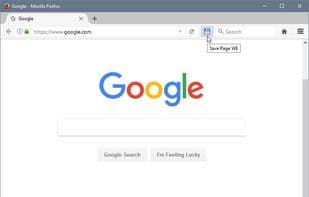
After installing Save Page WE, a new blue "floppy-disk" button will appear on the main toolbar.
To save a webpage from all currently selected tabs, simply click the Save Page WE toolbar button.
Options are available to set the button action to:
- Save selected tabs (Basic, Standard, or Custom profile)
- Save listed URLs (Basic, Standard, or Custom profile)
When saving a file, there is an option to prompt the user for a comment.
An option is available to use the old saving method, as used in version 18.0 or earlier.
When saving a page, there is an option to always show the "Save As" dialog. If this option is not enabled, the "Save As" dialog will only appear if Firefox's download settings are configured to "Always ask you where to save files."
An option is provided to specify the format of the saved filename. See the "Saved Filename" section below for details.
By default, saved HTML files will have the ".html" extension.
...Learn more at [https://addons.mozilla.org/en-us/firefox/addon/save-page-we/](https://addons.mozilla.org/en-us/firefox/addon/save-page-we/)
How to use Save page we?
Save Page WE is a browser extension that saves the currently displayed full webpage as a single HTML file, reproducible in any browser with high accuracy. It supports saving single pages, multiple selected tabs, or batch saving via URL lists.
Core Functions of Save page we
Extendable via plugins/extensions, save web pages for offline use
Usage Scenarios of Save page we
- Saving important web content as offline-viewable HTML files
- Saving multiple open tabs at once for future reference
- Automatically batch-saving web pages based on preset URL lists
- Automating web page saving via command line
- Saving search result pages that require lazy loading to display fully
- Adding comments when saving files
Common Questions about Save page we
What does Save Page WE do?
How do I use Save Page WE?
What are the core features of Save Page WE?
What are the use cases for Save Page WE?
















