




Product Information
What is Search multi tabs?
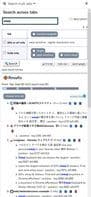
Search for word positions in your tab's body or title/URL, then list them in the Sidepanel.
Search the web or titles (Andurl) by word.
Display a clickable list.
This list includes the context around the word, highlighted in color. It also jumps to the Y position (page axis).
Certain tab operations are equipped, such as deleting tabs or reloading with icons.
Favicons are also displayed!
Jump-to access or Google search (with ALT+Enter) is supported.
How to use Search multi tabs?
Search Multi Tabs is a browser extension that helps users search for specific terms across all open tabs' content, titles, or URLs, displaying results as a clickable list in the sidebar for improved information retrieval efficiency.
Core Functions of Search multi tabs
Search bar
Usage Scenarios of Search multi tabs
- Find specific keywords across multiple open web pages.
- Quickly locate the content area containing the search term on a webpage.
- Manage and filter tabs by searching via titles or URLs.
- Delete or reload tabs from search results.
- Use shortcuts to quickly jump to a specific tab in search results.
- Quickly submit search terms to Google for a new tab search.
Common Questions about Search multi tabs
What does Search Multi Tabs do?
How do I use Search Multi Tabs?
What are the core features of Search Multi Tabs?
What are the application scenarios of Search Multi Tabs?
















