
Product Information
What is Streamer mode?
Hide visible personal information from the page, similar to Discord's Streamer Mode.
Features:
Ensures the page does not display your personal information even before and during loading.
Prevents changes to the page from revealing your personal details.
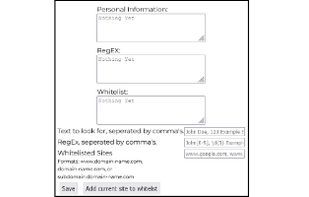
Allows specifying any string as personal information.
Warns users if the page isn't fully supported by the extension to prevent accidental information leaks.
Explanation:
When people share their screens on platforms like Discord, Zoom, or even Twitch.tv, they often use their browsers to react to videos, present information, play games, etc. If they visit a page displaying their full name, email, or other personal details, that information becomes visible without their control. This data can then be exploited for spam, doxxing, or harassing streamers or users on these platforms. Platforms like Discord have built-in "Streamer Mode" that hides personal information within Discord. However, these modes don't protect users when streaming their browsers. Other sites or platforms can still expose personal information, and until recently, there were no tools to safeguard users. This extension addresses these issues. With it, you can prevent your information from falling into the wrong hands by proactively removing such details from pages before they're even viewed.
Known Issues:
Requires updates when new unsupported websites are reported (and manually updated on Chrome/Opera).
Page titles remain visible during loading, potentially leaking personal information contained in them.
PII can still be identified by detecting altered text (Credit: u/cn0mmnb).
How to use Streamer mode?
Streamer Mode is a browser extension designed to hide visible personal information on webpages, preventing accidental exposure of sensitive data during screen sharing or streaming by pre-removing such details before page load.
Core Functions of Streamer mode
Streaming Media
Usage Scenarios of Streamer mode
- When screen sharing on platforms like Discord, Zoom, etc.
- When live streaming on platforms like Twitch.tv.
- Watch videos and react using a browser.
- Present information or give demonstrations using a browser.
- Play games using a browser.
Common Questions about Streamer mode
What does Streamer Mode do?
How do I use Streamer Mode?
What are the core features of Streamer Mode?
What are the use cases for Streamer Mode?