




Product Information
What is Swift selection search?
Swift Selection Search (SSS) is an add-on that allows you to quickly search selected text on a page using your preferred search engine.
Select some words on a page, and a small pop-up with search engines will appear above your cursor. Press ONE, and it will automatically search the selected text with that engine!
SSS is highly customizable. Open the Firefox Add-ons (the puzzle piece icon!), go to the "Swift Selection Search" options page, and follow the brief instructions at the top.
You can define which search engines appear in the pop-up, how the icons look, what happens when you click them, where the pop-up appears, whether it hides when scrolling, whether text is automatically copied upon selection, and many more options.
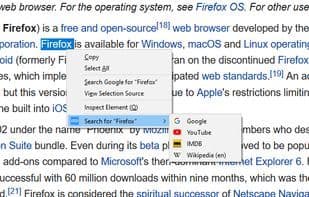
You also get an optional context menu for searching with any engine. Alternatively, you can disable the pop-up entirely and keep only the context menu. Your choice. :)
How to use Swift selection search?
Swift Selection Search is a Firefox extension enabling quick searches from selected text via popup or right-click menu with preset engines.
Core Functions of Swift selection search
Search bar
Usage Scenarios of Swift selection search
- After selecting text on a webpage, choose a search engine from the pop-up near the mouse to perform a search.
- Use any preset search engine to search selected text via the right-click context menu.
- Customize the list of search engines displayed in the pop-up.
- Adjust the appearance and click behavior of search engine icons.
- Configure the pop-up's position and whether it hides when the page scrolls.
- Set text to be automatically copied when selected.
Common Questions about Swift selection search
What does Swift Selection Search do?
How do I use Swift Selection Search?
What are the core features of Swift Selection Search?
What are the use cases for Swift Selection Search?
















