




Product Information
What is Tab group switch?
Warning:
For those seeking a QuickSaver (or other similar tab group plugin) replacement for tab groups, this add-on is not an equivalent replacement and is very different. When switching groups, this add-on will completely close and reload tabs, not just hide/show them. Form data, scroll positions, and tab history will be lost.
This add-on was created as a middle ground between bookmarks and the old Panorama tab groups to save resources while still getting some of the functionality of tab groups.
If you want something closer to a QuickSaver replacement for tab groups, try Conex or Simple Tab Groups.
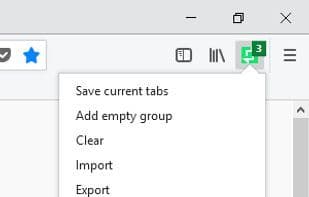
If you still want to migrate to this add-on, the best way is to first 'Bookmark All Tabs...' in the 'Tab Context Menu,' have only one group's tabs open and close the rest, then click 'Save Current Tabs' to create a new group with these tabs. Do the same for each group. You can change group names by right-clicking the group and selecting 'Edit.' Tab Group Switch saves open tabs into tab groups, which you can switch between and edit.
You can add new tabs to existing groups, update groups with currently open tabs, and export saved data to a local file.
Turn on the AutoSave feature to automatically save all open tabs at each set interval, making the add-on act as a simple session manager.
How to use Tab group switch?
Tab Group Switch is a browser extension for saving and managing tab groups, allowing users to switch between and edit different tab groups, saving resources and providing tab grouping functionality.
Core Functions of Tab group switch
Tab Grouping
Multi-tab Browsing
Tab manager
Tag grouping
Tabbed Browsing
Usage Scenarios of Tab group switch
- Save currently open tabs as a new group.
- Switch between different tab groups.
- Add new tabs to an existing group.
- Update a group with currently open tabs.
- Export saved tab group data to a local file.
- Enable auto-save as a simple session manager.
Common Questions about Tab group switch
What does Tab Group Switch do?
How do I use Tab Group Switch?
What are the core features of Tab Group Switch?
What are the use cases for Tab Group Switch?
















