




Product Information
What is Tabme?
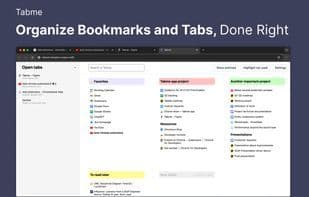
Effortlessly save tabs and navigate through them. Tabme streamlines your workflow by organizing project links for access on a single screen.
Use colors and spatial arrangement to instantly locate bookmarks. Tabme is completely free to use.
**Key Features:**
✔ One-click access to any saved tab. The most frictionless UX in tab and bookmark management.
👆 Save tabs with intuitive drag-and-drop.
📦 Shelve and restore open tabs into folders.
🧹 Click the "Defup" button to close duplicate tabs in one click.
🔎 Search across all tabs: open, saved, archived, and recently closed.
🗑 Archive unused bookmarks instead of deleting them when a project is done. This keeps your workspace tidy while retaining access to all archived bookmarks.
🌈 Color-code folders to quickly find saved bookmarks.
🚀 Performance-driven: Tabme operates swiftly, even with hundreds of saved bookmarks.
✔ Keyboard accessibility support. Press Tab and use arrow keys to navigate bookmarks.
🌙 Dark mode theme support.
✔ Instant tab access: Tabme replaces the traditional "new tab" page, allowing immediate access to all saved tabs.
**Guides:** https://gettabme.com/guide.html
**What's New:** https://gettabme.com/whats-new.html
How to use Tabme?
Tabme is a Chrome extension that helps users easily save, organize, and manage browser tabs and bookmarks, improving efficiency with an intuitive interface and ensuring project links are always accessible.
Core Functions of Tabme
Privacy-Focused
Lightweight
Ad-Free
No Tracking
Dark Mode
File Tagging
Usage Scenarios of Tabme
- Organize project links for easy access.
- Quickly find and access saved bookmarks.
- Reduce memory usage by closing duplicate tabs.
- Record project-related ideas and to-dos.
- Archive unused bookmarks after project completion.
- Search across all open, saved, and recently closed tabs.
Common Questions about Tabme
What does Tabme do?
How do I use Tabme?
What are the core features of Tabme?
What are the use cases for Tabme?
















