




Product Information
What is Tabsfolders?
TabsFolders enables you to save, manage, sync, and share bookmarks at lightning speed. TabsFolders displays your countless tabs and offers you an easy-to-use tool to organize all the information you need.
Once you add the extension to your browser, you'll reach new heights of internet efficiency.
With TabsFolders' drag-and-drop interface, you can store and manage thousands of bookmarks.
Using neatly arranged folders and subfolders, you can always find the links you need in seconds.
Imagine compiling all your research for a blog post in a folder—just double-click it, and all the tabs will open swiftly in a new window. Boom! You're ready to work.
By clicking the "Save" button when opening a folder in your browser, you can also easily add or remove tabs. You can even drag and drop multiple tabs between open windows or saved folders.
These folders (and the tabs within them) can be moved, renamed, and duplicated just like files on your computer or drive!
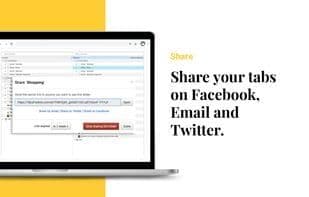
Show off your newfound efficiency by sharing bookmarks with your team or across browsers—all with just a few clicks.
Additionally, with TabsFolders, bookmarks sync seamlessly between browsers, so it doesn't matter which browser you or your colleagues use to save links.
There are also extra perks, such as a side-by-side folder view for easy drag-and-drop, a trash folder to recover any accidentally deleted folders, and customizable keyboard shortcuts for all major ___brand_brand_placeholder_p functions.
Given the endless expanse of the internet, it's no surprise that your tabs keep piling up.
But now it's time to break free using this time-saving tool from #tablefif.
How to use Tabsfolders?
TabsFolders is a browser extension tool that helps users quickly save, manage, sync, and share bookmarks, improving internet efficiency and making it easy to organize and find needed information.
Core Functions of Tabsfolders
Tab manager
Crash recovery
Multi-Tab Browsing
Usage Scenarios of Tabsfolders
- Organize research materials for blog posts and open all related tabs with one click.
- Easily add or remove tabs when opening bookmark folders in the browser.
- Manage multiple tabs across windows or saved folders with drag-and-drop.
- Quickly share bookmarks with team members or across different browsers.
- Ensure bookmarks sync across all browsers for easy access.
Common Questions about Tabsfolders
What does TabsFolders do?
How do I use TabsFolders?
What are the core features of TabsFolders?
What are the use cases for TabsFolders?
















