



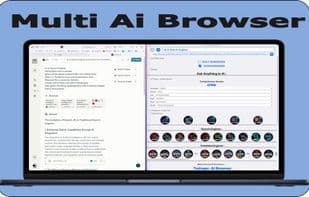

Product Information
What is Twinqer: ai browser?
With the Twinquer AI browser application for MacOS, you can quickly discover which AI provides the best answers.
The Twinquer app is the optimal solution for checking and combining different AI platforms.
We designed this AI application to enhance all your typing workflows,
by utilizing a single query bar for all AI platforms,
eliminating the need to repeat or type the same question over and over.
You can efficiently fine-tune all your AI queries by simply selecting a few checkboxes.
Choose from 6 categories: Language, Format, Task, Style, Tone, Words
Benefits:
- Retrieve AI answer results from the built-in browser or Safari.
- Access multiple AI platforms.
- Perplexity AI, Gemini AI, You AI, Claude AI, ChatGPT
- Diverse search engines.
- Google, Bing, DuckDuckGo, YouTube, Swisscow, StartPage, Mojeek, ...
- 8 different translation options.
- Lightweight application.
- User-friendly interface.
- Fast response times.
- Improved workflow.
- Google search with precision features.
- Reduced repetitive typing.
- 6x AI tuning checkboxes:
- Language: Dutch
- Format: HTML
- Task: Philosophy
- Style: Academic
- Tone: Authoritative
- Get AI answers with 5x headings (5x paragraphs).
Features:
- Access multiple AI platforms (free to use).
- Supports Spintext (MAIN) + 2x search bars (sub) in a single search bar.
- Multilingual support.
- Reword tool.
- Meta-search functionality.
- Search Google by time, extension, or Allintitle, ...
For Beginners:
We offer two convenient AIs (Perplexity AI and You AI) with no login required.
Simply ask a question, and it will return the answer to you.
For other AIs like Gemini AI, Claude AI, or ChatGPT, a login is necessary.
How to use Twinqer: ai browser?
Twinqer is an AI browser app for macOS that lets users ask questions to multiple AI platforms simultaneously via a query bar, quickly comparing responses to improve efficiency and fine-tune AI answers.
Core Functions of Twinqer: ai browser
Privacy-Focused
Lightweight
No Tracking
Ad-Free
No Registration Required
AI writing
Focus on privacy
Lightweight
Usage Scenarios of Twinqer: ai browser
- Quickly Compare Answers from Different AI Platforms Like Perplexity Ai, Gemini Ai, You Ai, Claude Ai, and ChatGPT.
- Effectively Fine-Tune AI Queries Using Checkboxes (e.g., Language, Format, Job, Style, Tone, Word Count).
- Optimize Question Flow by Reducing Repetitive Inputs with Main and Sub Search Bars.
- Get AI Answers in Built-in Browser or Safari and Compare Side by Side.
- Optimize Google Search Results, e.g., by Time, Extension, or Title.
- When Conducting Research, Quickly Gather and Compare Information from Multiple AI Engines.
Common Questions about Twinqer: ai browser
What does Twinqer do?
How do I use Twinqer?
What are the core features of Twinqer?
What are the use cases for Twinqer?
















