




Product Information
What is Twitch live extension?
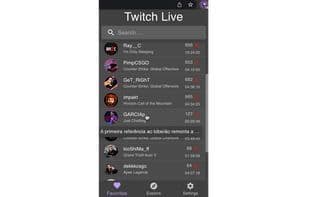
The browser extension lists your live streams, follows the broadcasters, and sends notifications when new streams start.
To get started, open the extension, log in with your Twitch account so it only accesses your public information and followed channels. Each time you click the extension icon, you'll see the streamers you follow.
This extension supports just-went-live notifications. If you'd like to enable them, open the extension, go to settings, and turn on the just-went-live notifications.
There's also a button to log out of your Twitch account.
Special thanks to everyone who helped test this extension: https://github.com/pedros11/twitch-live-extension#contribution
How to use Twitch live extension?
Twitch Live Extension is a browser extension that lists live-streaming broadcasters you follow and notifies you when they start new streams, helping you stay updated on your favorite broadcasters' activities.
Core Functions of Twitch live extension
Browser extension, Microsoft Edge extension
Browser Extension
Microsoft Edge extension
Usage Scenarios of Twitch live extension
- Check if Followed Streamers Are Live
- Receive Notifications When Followed Streamers Go Live
- Quickly Check Live Status by Clicking the Extension Icon
- Enable 'Just Went Live' Notifications
Common Questions about Twitch live extension
What does Twitch Live Extension do?
How do I use Twitch Live Extension?
What are the core features of Twitch Live Extension?
What are the use cases for Twitch Live Extension?
















