




Product Information
What is Ultrablock?
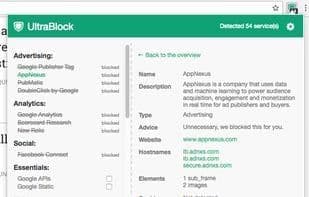
Commercial websites use external services to configure and track you to optimize conversions. As a visitor, you don't need these tools—they only slow you down. UltraBlock automatically blocks these services, so websites load faster and your privacy remains secure. UltraBlock maintains a crowdfunded database of external services. Our extension fully reveals what loads in the background of the sites you visit. You can block services automatically or manually and see who's trying to track you.
How to use Ultrablock?
UltraBlock is a browser extension that protects user privacy by automatically blocking ads, invisible trackers, and third-party cookies, while speeding up website loading and enhancing security.
Core Functions of Ultrablock
Block trackers
Block
Block Trackers, Block
Usage Scenarios of Ultrablock
- Automatically block ads and trackers while browsing the web.
- Manually block services on specific websites or all websites.
- Remove third-party cookies after each visit to prevent tracking.
- Protect personal privacy and prevent companies from tracking and analyzing user behavior.
- Speed up website loading and enhance browsing experience.
- View tracker host countries to understand data storage locations.
Common Questions about Ultrablock
What does UltraBlock do?
How do I use UltraBlock?
What are the core features of UltraBlock?
What are the applications of UltraBlock?
















