




Product Information
What is Umatrix?
Click and block/allow any category of requests proposed by your browser. Use it to stop scripts, iframes, ads, Facebook, etc. uMatrix: A click-based matrix firewall with numerous privacy-enhancing tools. uMatrix gives you complete control over where your browser can connect, what types of data it can download, and what it's allowed to execute. No one else decides for you—you make the choice. You have full control over your privacy.
Out of the box, uMatrix operates in a relaxed block-all/whitelist-exceptionally mode, meaning sites relying on third-party scripts might appear "broken." With just two clicks, you can switch uMatrix to an allow/block-visible mode, which typically doesn't disrupt websites.
For the myth that "Chromium-based browsers can't reliably block JavaScript," see: https://github.com/gorhill/uMatrix/wiki/Blocking-JavaScript-execution-reliably-in-Chromium-based-browsers.
View all remote connections based on whether they're blocked or allowed—failed or attempted (you decide).
Whitelist/blacklist one or more categories of requests by destination and data type with a click (blocked requests never leave your browser).
Effective blacklisting means cookies stay in your browser, JavaScript doesn't run, plugins don't play, tracking pixels aren't downloaded, and more.
You don’t have to rely solely on an external curated blacklist (which likely has missing entries) while everything else goes unblocked—you’re in full control.
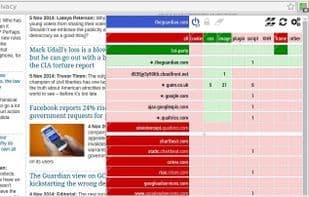
Ease of use: uMatrix lets you easily whitelist/blacklist net requests originating from web pages via a click-based matrix:
Domains (left column)
From very specific
To very general
Request types (top row)
Cookies
CSS-related resources (stylesheets & web fonts)
Images
Plugins
Scripts
XHR (requests made by scripts)
Frames
Others
How to use Umatrix?
uMatrix is a matrix-based, click-to-firewall browser extension that gives users full control over browser connections, data downloads, and executed requests to enhance privacy.
Core Functions of Umatrix
Privacy-Focused
Lightweight
Granular Control
Request Filtering
Block trackers
Browser Extension
Usage Scenarios of Umatrix
- Block requests from scripts, iframes, ads, and specific websites (e.g., Facebook).
- View and manage all remote connections made by the browser, whether blocked or allowed.
- Use a point-and-click matrix to allow or block network requests based on target domains and request types (e.g., cookies, scripts, images).
- Prevent cookies from leaving the browser, JavaScript execution, plugin playback, and tracking pixel downloads.
Common Questions about Umatrix
What does uMatrix do?
How do I use uMatrix?
What are the core features of uMatrix?
What are the use cases for uMatrix?
















