




Product Information
What is View source?
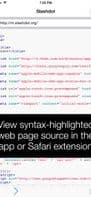
"View Source" is an application combined with an iOS 8 Safari extension, designed to effortlessly perform a crucial web developer task: inspecting the HTML, JavaScript, and CSS source code of any webpage, featuring beautiful and customizable syntax highlighting.
As a standalone app, you can enter a URL and instantly view its underlying source code. As an extension, it's even simpler: just browse the web in Safari as usual, and if you wish to examine the source of the current page, simply tap the action icon and select "View Source." You can then copy the text to the clipboard for use in other apps or send it via email.
To enable the Safari extension on iOS 8, launch Safari, tap the action button in the toolbar, scroll to the right, and select "More." Ensure "View Source" is enabled, position it within your Safari actions list, and tap "Done."
How to use View source?
View Source is an app and iOS 8 Safari extension designed to help web developers easily view the HTML, JavaScript, and CSS source code of any webpage, offering beautiful and customizable syntax highlighting.
Core Functions of View source
Customizable, Syntax Highlighting, Safari Extension
Customizable
Syntax Highlighting
Safari extension
Usage Scenarios of View source
- As a standalone app, input a URL to view webpage source code.
- As a Safari extension, view the current page's source code directly while browsing.
- Copy source code to the clipboard for use in other applications.
- Email the source code.
Common Questions about View source
What does View Source do?
How do I use View Source?
What are the core features of View Source?
What are the application scenarios for View Source?
















