




Product Information
What is Wiki-hover?
Access Wikipedia information instantly by hovering over any word on a webpage. Supports 9 Wikipedia languages: English, French, German, Spanish, Japanese, Russian, Portuguese, Italian, and Chinese.
How to use Wiki-hover?
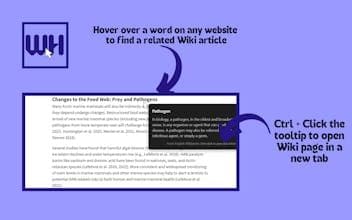
Wiki Hover is a browser extension that instantly displays Wikipedia information by hovering over or selecting text on web pages. It aims to provide uninterrupted, instant knowledge insights, enhancing the user's browsing experience.
Core Functions of Wiki-hover
Hover to Display Wikipedia Tips
Select Text for Instant Information Query
Show Images, Summaries, and Key Facts in Tooltips
Support for 9 Wikipedia Languages
Provide Customization Options Like Adjusting Hover Delay and Dark Mode
Ctrl+Click to Open Full Article in New Tab
Usage Scenarios of Wiki-hover
- Student research topics
- Professionals reading industry articles
- Multilingual users
- Knowledge seekers eager to learn
- Any user who values instant knowledge
Common Questions about Wiki-hover
What does Wiki Hover do?
How do I use Wiki Hover?
What are the core features of Wiki Hover?
What are the application scenarios of Wiki Hover?
















